
|
A few days ago, I ran an experiment with an AI-powered testing agent that lets you write test cases in plain English instead of code. I opened its natural language interface and typed four simple sentences to test google.com:  A real browser opened Google, found the search bar, typed a query, checked for the autocomplete dropdown, and verified there was no placeholder, all from those four lines. No Playwright selectors. No That made me curious: what happens if I try this on something actually complex? So I tested my own full-stack app's auth endpoint the same way:
Within 15 seconds, done. The same test took me an hour to set up manually, building a session helper, separating my Express app from the server startup, seeding a test database, just so I could write five lines of Supertest code. I ended up testing my entire application both ways: the traditional manual approach and the AI-assisted approach. Same endpoints, same assertions, completely different experience. This article is about what I learned. But before I get into how I tested it, let's talk about what actually matters: the testing concepts themselves. Because no approach, manual or automated, will save you time or energy if you don't understand what you're testing and why. What we'll cover:
PrerequisitesTo get the most out of this article, you should have a basic understanding of JavaScript and Node.js, along with some familiarity with React and Express. Experience writing simple tests with any JavaScript testing framework like Jest or Vitest will be helpful, though I'll explain the core testing concepts as we go. You should also have Node.js installed on your machine. If you want to follow along with the manual testing examples, you'll need Vitest (or Jest) for unit and API tests, Supertest for HTTP endpoint testing, and Playwright for end-to-end browser tests. For the AI-assisted approach, I used KaneAI by LambdaTest, which you can explore through their platform. How Testing Actually Works in Full-Stack AppsIf you've only tested isolated React components or written a few unit tests for utility functions, full-stack testing feels like a different sport. The concepts are the same, but the complexity jumps dramatically. Here's what you actually need to know. Three Layers, Three Different JobsEvery full-stack application has three natural testing layers, and trying to cover everything with just one of them leads to either fragile tests or blind spots. Unit Tests Unit tests check that individual functions return the right output for a given input. They don't touch the database, the network, or the browser. They run in milliseconds. If your function takes a string and returns a formatted slug, a unit test calls that function and checks the result. That's it. API TestsAPI tests check that your backend endpoints return the right responses. They send real HTTP requests to your Express (or Next.js) app and verify the status codes, response shapes, and error handling. If your End-to-end (E2E) TestsEnd-to-end (E2E) tests open a real browser and interact with your app the way a user would. They click buttons, fill forms, navigate pages, and check that the right things appear on screen. If your login flow should redirect to a dashboard after authentication, an E2E test walks through that entire journey. The Pain Points Nobody Warns You AboutTutorials make all three layers look straightforward. In practice, each one has a trap. First, we have the session problem. Most real apps have authentication. To test any authenticated endpoint, you need a valid session. That means you need a helper function that logs in a test user, extracts the session from the This sounds simple. It took me an hour to build one that actually works with express-session. Every project reinvents this wheel. Then we have the app vs. server separation issue. Supertest (the most popular API testing library) needs to import your Express app without starting a real server. If your You have to separate your app definition from the server startup. You also have the SSE and real-time nightmare. If your app uses Server-Sent Events (SSE) or WebSockets, you're testing time-dependent behavior. You open a connection, trigger an action, and wait for an event to arrive. If the event takes too long, your test times out. If you don't set a timeout, the test hangs forever. You end up writing 30 lines of Promise wrappers, timeout handlers, and cleanup logic for a single assertion. Finally, there's the selector fragility trap. E2E tests that use CSS selectors ( The fix is using Schema Validation: The Hidden Time SinkHere's something nobody tells you about API testing. Writing the assertion for "does this endpoint return 200" takes one line. Writing assertions that verify the shape of the response, every field exists, every field has the right type, every enum value is valid, takes 15 to 20 lines per endpoint. Multiply that across a dozen endpoints and you're spending hours writing boilerplate like: It's important work, though: schema validation catches real bugs when your backend changes a response shape. But the repetitiveness is what makes it a good candidate for automation, which I'll get to later. These aren't edge cases. These are the everyday realities of testing a full-stack app. Knowing them upfront saves you from the "why is this so much harder than the tutorial??" frustration. What Made This HardA few months ago, I wrote a freeCodeCamp article about testing JavaScript apps from unit tests to AI-augmented QA. That article covered testing fundamentals with clean, simple examples. After publishing it, I kept thinking: what happens when you apply all of this to something messy? I had the perfect candidate. Creoper(code name) is an AI-powered project management tool I built that connects GitHub with Discord. Teams can monitor repositories, track pull requests, and query project status using natural language, all without leaving their chat platform.  I built it across two internal hackathons at CreoWis, and it won both times. What started as a simple GitHub-Discord automation bot evolved into a full product with five interconnected components: 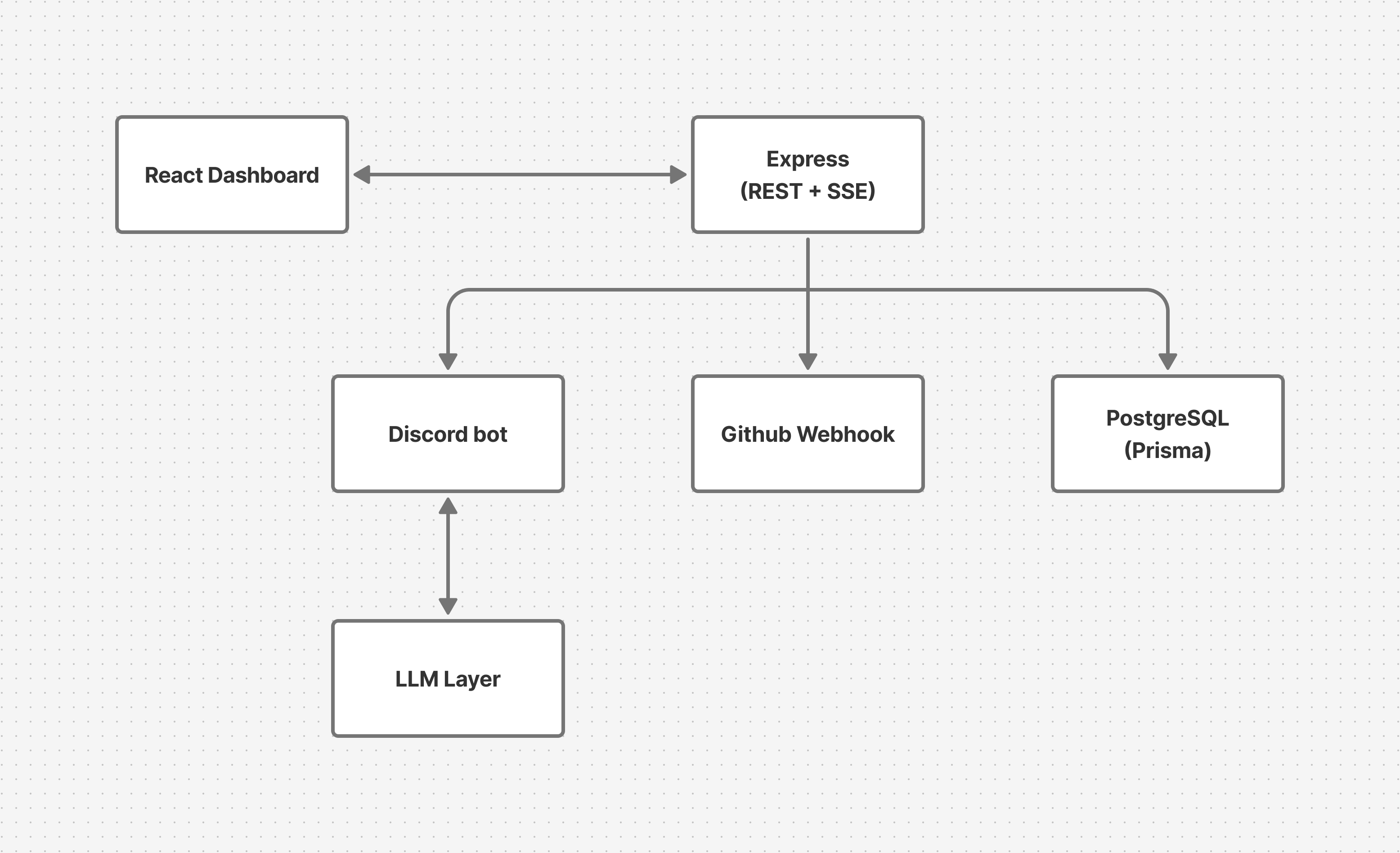 It has a React dashboard with GitHub OAuth. An Express backend with REST APIs and SSE. A Discord bot that processes natural language through an LLM intent detection layer. PostgreSQL with Prisma. GitHub webhook handlers. But here's the thing: despite winning two hackathons, Creoper had zero test cases. The app wasn't even deployed yet. I'd been stuck on Railway monorepo deployment issues for weeks. So I was staring at a system that had every real-world testing challenge I'd just written about, auth flows, real-time events, multiple integration points, complex business logic, and no safety net at all. I decided to test it two different ways and document what actually happened. If you want to explore the full project, I've written two separate blogs about how I built it. The Manual ApproachI mapped pure logic components like the intent parser and embed builder to unit tests, since they deal with straightforward input-output behavior. I assigned Express endpoints to API tests using Supertest, which let me send real HTTP requests and verify response codes and shapes. I planned to cover the React dashboard with end-to-end tests using Playwright, simulating actual user interactions in a real browser. As for Discord bot interactions and webhook delivery, those couldn't be automated reliably yet, so I documented them and tested them manually. Here's what each layer looked like in practice. Unit Tests: The Easy WinCreoper has a function that classifies Discord messages into structured intents. If someone types "list prs," it should return If the message is gibberish, it should return Notice these aren't just "does it work"checks. They're testing a safety mechanism, the threshold between executing an action and falling back. These are exactly the kinds of tests that need to be written by hand because you have to understand the business logic behind the numbers. I also tested the Discord embed builder the same way. Give it push event data, check that the formatted message contains the right repo name, author, branch, and commit messages. Pure input, pure output, no external dependencies. Unit tests ran in milliseconds and caught edge cases like empty commit arrays immediately. API Tests: Where the Friction StartsTesting the Express endpoints required the infrastructure work I described earlier. I separated Five lines of test code, one hour of infrastructure to make those five lines work. Then I had to repeat this pattern across every endpoint: repos, pull requests, issues, active repo configuration, each with happy path, error cases, and the tedious schema validation I mentioned earlier. The SSE test was the worst. I needed a Promise wrapper, an EventSource connection, a timeout handler, an E2E Tests: The Full JourneyPlaywright's E2E tests were actually pleasant to write once I added The real cost wasn't writing the tests — it was maintaining them. Midway through development, I renamed a CSS class from The AI-Assisted ApproachNow here's the same project, tested with a fundamentally different workflow. Instead of writing test code, you describe what you want to test in natural language. An AI agent interprets your intent, interacts with the actual application, generates assertions, and produces exportable test code. The tool I used is KaneAI, a GenAI-native testing agent that covers web UIs, APIs, and mobile apps through natural language test authoring with real browser execution. That's the only background you need. Let me show you the workflow. API Testing: Describing Instead of CodingInstead of writing Supertest code, I opened the slash command menu, selected API, and pasted a curl command: It fired the request through the tunnel, showed the 401 response, and I added it to my test steps. For the authenticated version, I pasted the same command with a session from DevTools. No For the repository endpoints, I described the flow in plain English: It generated assertions for the happy path and added schema validation I didn't ask for checking that E2E Testing: Plain English, Real BrowserFor the React dashboard, instead of Playwright selectors, I described: It executed each step in a real cloud browser connected to my localhost. No After each test, I exported the generated code. It came with wait conditions and assertion logic baked in. It wasn't perfect copy-paste: I updated environment variables, adjusted base URLs, and fixed a few field name mismatches where it expected The Feature That Surprised MeMidway through testing, I renamed that CSS class from But the AI tool's auto-healing detected the selector change, found the closest matching element based on the test's original intent, and continued the test with a review flag. No code changes needed. For a rapidly changing MVP where class names are still in flux, that alone saved significant maintenance time. When to Use Which ApproachAfter testing the same project both ways, here's my honest take. Write tests by hand when you're testing business logic that requires domain understanding. For Creoper's intent parser, I needed to think about what "low confidence" means in the context of the application's safety mechanism. An AI tool can generate assertions, but it can't understand why a confidence score of 0.5 should trigger a fallback instead of an action. Pure logic with meaningful edge cases is where hand-written tests earn their keep. You should also write tests by hand when they need to run in CI without external dependencies. Vitest tests with mocked dependencies are self-contained. They run in milliseconds and don't need a tunnel, a cloud browser, or a third-party account. Hand-written tests are also best when the team needs to maintain them. Hand-written tests are transparent. Generated code, even when exported, can feel opaque to someone who wasn't there when it was authored. Reach for AI-assisted testing, on the other hand, when your UI changes frequently. For an MVP where CSS classes and component structure are still in flux, auto-healing prevents the "my tests broke because I renamed a div" problem. You spend less time fixing selectors and more time shipping features. AI-assisted testing is also helpful when you need coverage fast and plan to refine later. The 70–80% foundation is a real boost when you're the only developer and you need coverage now. You can always hand-tune the exported code later. Never rely solely on either approach to understand your system. No tool knows that an SSE connection drops after 30 seconds if the heartbeat isn't configured. No tool understands that a Discord bot should never execute a write action when confidence is below 0.8. No tool realizes the OAuth callback silently fails if the The strategy relies on you knowing which endpoints are crucial, identifying dangerous edge cases, and understanding what should occur during failures. The tool simply accelerates how quickly you can articulate and implement that strategy. ConclusionMy Full-stack app won two hackathons. But without tests, it was a house of cards. One renamed CSS class, one changed API response, and the whole system could silently break. Testing it both ways taught me that the manual vs AI question is the wrong question. The real skill is matching the approach to the problem. Write unit tests by hand for business logic. Use AI-assisted testing when you're drowning in repetitive schema validation across a dozen endpoints. Use auto-healing for E2E tests on a fast-changing UI. And for the things you can't automate yet, like Discord bot interactions or webhook delivery, document them and test them manually until you can. If you're building something complex and thinking "I'll add tests after I deploy", flip that. Test what you can now. Document what you can't. When deployment day comes, you'll ship with confidence instead of anxiety. Before We EndI hope you found this article insightful. I’m Ajay Yadav, a software developer and content creator. You can connect with me on:
See you in the next article — until then, keep learning! |