The Java Handbook – Learn Java Programming for Beginners
Java has been around since the 90s. And despite its massive success in many areas, this cross-platform, object-oriented programming language is often maligned. Regardless of how people feel about Java, I can tell you from experience is that it is an excellent programming language. After its first appearance back in 1995, it's still widely-used – and chances are it's not going anywhere anytime soon. You can use Java to build servers, create desktop applications, games, mobile applications and more. There are also other JVM (we'll discuss what that means very soon) languages such as Kotlin, Groovy, Scala, and Clojure that you can use for different purposes. Java is also cross-platform which means code you write and compile on one platform can run on any other platform that has Java installed on it. We'll discuss this topic in much more detail later on. For now, I can tell you that although Java has its fair share of flaws, it also a has a lot to offer. The only re-requisite for this course is familiarity with any other programming language such as Python, JavaScript, and so on. Although I'll explain crucial programming concepts in the context of Java, I'll not explain things like what a variable is in the context of programming in general. Ideally the first step should've been setting up Java on your computer, but I don't want to bore you with downloading and installing a bunch of software right at the beginning. For this example, you'll use https://replit.com/ as your platform. First, head over to https://replit.com/ and create a new account if you don't already have one. You can use your existing Google/GitHub/Facebook account to login. Once logged in, you'll land on your home. From there, use the Createbutton under My Replsto create a new repl. In the Create a Replmodal, choose Javaas Template,set a descriptive Titlesuch as HelloWorldand hit the Create Replbutton. A code editor will show up with an integrated terminal as follows: On the left side is the list of files in this project, in the middle is the code editor, and on the right side is the terminal. The template comes with some code by default. You can run the code by hitting the Runbutton. Go ahead and do that, run the program. If everything goes fine, you'll see the words "Hello world!" printed on the right side. Congratulations, you've successfully run your first Java program. The hello world program is probably the most basic executable Java program that you can possibly write – and understanding this program is crucial. Let's start with the first line: This line creates a This is a This top level public class has to be named exactly the same as the source code filename. That's why the file named To understand why, click on the three dots in the list of files and click on the Show hidden filesoption. This will unveil some new files within the project. Among them is the Now, modify the existing Hello World code as follows: As you can see, a new class called A new bytecode named This creates confusion about which class is the entry-point to this program. To solve this issue, Java uses the class that matches the source code file name as the entry-point to this program. Enough about the class, now let's look at the function inside it: The In Java, you have to write this function as exactly The return type has changed from Listen to that suggestion and revert your program back to how it was before. The The The In Java, every statement ends with a semicolon. Unlike JavaScript or Python, semicolons in Java are mandatory. Leaving one out will cause the compilation to fail. That's pretty much it for this program. If you didn't understand every aspect of this section word by word, don't worry. Things will become much clearer as you go forward. For now, remember that the top level I've uttered the word "bytecode" a few times already in the previous section. I've also said that Java is "cross-platform" which means code written and compiled in one platform can run on any platform that has Java installed on it. You see, your processor doesn't understand English. In fact the only thing it understands are zeros and ones, aka binary. When you write and compile a C++ program it results in a binary file. Your processor understands it and based on the program's targeted platform, this file can be different. Take an AMD64 and an ARMv8-A processor for example. These processors have different instruction sets. So in order to run your program on these two different platforms, you'll have to compile them separately. But a Java program can be written once and run anywhere. I hope you remember the bytecodes we talked about in the previous section. When you compile Java code it doesn't result in binary but rather in bytecode. This bytecode is not entirely binary but it's also not human readable. In fact, your processor can't read it either. So instead of throwing this bytecode at the CPU, we instead run it through the Java Virtual Machine or JVM for short. JVM then reads and interprets the bytecode to the CPU. If you would like to understand the architecture of JVM at a deeper level, I would suggest Siben Nayak's in-depth article on the topic. JRE stands for Java Runtime Environment and JDK stands for Java Development Kit. The JRE or Java Runtime Environment packages together an implementation of the JVM along with a set of libraries required for running Java programs. The JDK, on the other hand, packages the JRE along with all the necessary libraries for developing Java programs. So if you want to run Java programs on your computer you install the JRE. If you want to develop Java programs yourself, you install the JDK. There are multiple implementation of the JDK. There is the Java SE (Standard Edition) Development Kit from Oracle, then there is the OpenJDK, an official reference implementation of Java SE (Standard Edition) Development Kit. As you can tell from the name of OpenJDK, it's open-source. So there are multiple builds of it. If you're on a Linux machine and use your distro's package manager to install JDK, it's highly likely that you'll install an OpenJDK build such as Adoptium, Microsoft Build of OpenJDK and so on. I hope that you understand that JRE is a superset of JVM and JDK is a superset of JRE. Don't worry about different implementations or builds at the moment, you'll get your hands on them when the time comes. First, head over to https://www.oracle.com/java/technologies/downloads/ and download the latest version of the Java SE Development Kitaccording to the platform you're on: Once the download has finished, start the installer and go through the installation process by hitting the Next buttons. Finish it by hitting the Close button on the last page. The installation process may vary on macOS and Linux but you should be able to figure it out by yourself. Once the installation has finished, execute the following command on your terminal: If it works, you've successfully install Java SE Development Kit on your computer. If you want to use OpenJDK instead, feel free to download Microsoft Build of OpenJDK or Adoptium and go through the installation process. For the simple example programs that we're going to write in this article, it won't matter which JDK you're using. But in real life, make sure that your JDK version plays nicely with the type of project you're working on. When it comes to Java, IntelliJ IDEA is undeniably the best IDE out there. Even Google uses it as a base for their Android Studio. The ultimate version of the IDE can cost an individual up-to $149.00 per year. But if you're student, you can get educational licenses for all JetBrains products for free. There is also the completely free and open-source community edition. This is the one we'll be using throughout the entire book. Head over to the IntelliJ IDEA download page, and download the community edition for your platform. Once the download finishes, use the installer to install IntelliJ IDEA like any other software. Use the shortcut from your start menu to start IntelliJ IDEA. The following window will show up: Use the New Projectbutton and a New Projectwindow will show up: Put a descriptive name for your project. Leave the rest of the options as they are and press the Createbutton. The project creation shouldn't take longer than a moment and once it's done, the following window will show up: That's the project tool window on the left side. All your source code will live inside that Right click on the In the next step, put a name, such as A new class will be created with a few lines of code. Update the code as follows: To run this code, use the green play button on the right side of the top bar. The code will run and the output will be shown in the integrated terminal at the bottom of the window. Congratulations, you've successfully recreated the previously discussed To work with different kinds of data in Java, you can create variables of different types. For example, if you want to store your age in a new variable, you can do so like this: You start by writing out the type of data or variable. Since At the moment, you've declared the variable but you haven't initialized it. In other words, the variable doesn't have any value. You can initialize the variable as follows: When assigning a value, you start by writing the name of the variable you want to initialize, followed by an equal sign (it's called the assignment operator) then the value you want to assign to the variable. And don't forget the semicolon at the end. The One thing that you have to keep in mind is you can not use an uninitialized variable in Java. So if you comment out the line The line Instead of declaring and initializing the variable in different lines, you can do that in one go as follows: The code should be back to normal again. Also, you can change the value of a variable as many times as you want in your code. In this code, the value of Keep in mind, while you can assign values to a variables as many times as you want, you can not declare the same variable twice. If you try to compile this code, the compiler will throw the following error message at you: The line Apart from variables, you may find the term "literal" on the internet. Literals are variables with hardcoded values. For example, here, There are some rules when it comes to naming your variables in Java. You can name it anything as long as it doesn't start with a number and it can't contain any spaces in the name. Although, you can start a variable name with an underscore (_) or a dollar sign ($), not being mindful of their usage can make your code hard to read. Variable names are also case sensitive. So Another important thing to remember is you can not use any of the keywords reserved by Java. There are around 50 of them at present. You can learn about these keywords from the official documentation but don't worry about memorizing them. As you keep practicing, the important ones will slip into your neurons automatically. And if you still manage to mess up a variable declaration, the compiler will be there to remind you that something's wrong. Apart from the rules, there are some conventions that you should follow: As long as you follow these rules and conventions, you're good to go. If you'd like to learn more about naming conventions in general, checkout my article on the topic. A Since the However, if you leave the variable uninitialized while declaring, the code will work: So, declaring a variable as At a high level, there are two types of data in Java. There are the "primitives types" and the "non-primitive" or "reference types". Primitive types store values. For example, A reference type, on the other hand, stores the reference to a memory location where a dynamic object is being stored. There are eight primitive data types in Java. Yeah yeah I know the table looks scary but don't stress yourself. You don't have to memorize them. You will not need to think about these ranges very frequently, and even if you do, there are ways to print them out within your Java code. However, if you do not understand what a bit is, I would recommend this short article to learn about binary. You've already learned about declaring an integer in the previous section. You can declare a Declaring a If you assign an Since This happens because, by default, every number with a decimal point is treated as a As you can imagine, Booleans will become much more useful once you've learned about conditional statements. So for now, just remember what they are and what they can hold. The In this example, you've saved the percent sign within a You can also use Unicode escape sequences to print out certain symbols. The Unicode escape sequence for the copyright symbol, for example, is Among these 8 types of data, you'll be working with Type conversion in Java can be either "implicit" or "explicit". When the compiler converts a smaller type of data to a larger one automatically, it's known as an implicit or narrowing type conversion. Since a double is larger than an integer, the compiler could easily perform the conversion. If you try to do the reverse however, you'll face the following error from the compiler: When performing an implicit conversion, the flow of conversion should be as follows: You can of course go from a You can also go from smaller data types to larger ones. That's called an explicit or widening type conversion. Previously you've seen that if you try to convert a larger data type to a smaller one, the compiler complains. But when you add the In doing so, you lose a part of your data. If you change the initial You can also convert a The flow of conversion in this case will be the opposite of what you've seen already. I'd suggest you to experiment by converting various values from one type to another and see what happens. This will deepen your understanding and make you confident. Wrapper classes can wrap around primitive datatypes and turn them into reference types. Wrapper classes are available for all eight primitive data types. You can use these wrapper classes as follows: All you have to do is replace the primitive data type with the equivalent wrapper class. These reference types also have methods for extracting the primitive type from them. For example, There are such methods for all eight datatypes. Although you'll use the primitive types most of the time, these wrapper classes will be handy in some scenarios we'll discuss in a later section. Operators in programming are certain symbols that tell the compiler to perform certain operations such as arithmetic, relational, or logical operations. Although there are six types of operators in Java, I won't talk about bitwise operators here. Discussing bitwise operators in a beginner guide can make it intimidating. Arithmetic operators are the ones that you can use to perform arithmetic operations. There are five of them: Addition, subtraction, multiplication, and division operations are pretty self-explanatory. Have a look at the following code example to understand: Outputs from the first four operations need no explanation. In the last operation, you've performed a modulo/modulus operation using the Addition and multiplication operations are quite simple. But, when performing a subtraction, if the first operand is larger than the second operand, the result will be a negative number, just like in real life. The type of data you're working with makes a difference in the result of division and modulo operations. Although the result of this operation should've been 1.6 it didn't happen because in Java, if you divide an integer by another integer, the result will be an integer. But if you change both or one of them to a float/double, everything will be back to normal. This principle applies to the modulo operations as well. If both or one of the operands are a float/double, the result will be a float/double. You've already worked with the assignment operator in a previous section. When you use the Combining the regular assignment operator with the arithmetic operators, you can achieve different results. The following code example should make things clearer: The other operators work the same. They operate and then assign the resultant value to the left operand. I could demonstrate the other ones using code but I think if you try them out yourself, you'll get a better understanding. After all, experimentation and practice are the only ways to solidify your knowledge. Relational operators are used to check the relation between operands. Such as whether an operand is equal to another operand or not. These relational operators return either There are six relational operators in Java. The following code example demonstrates the usage of these operators: Practical usage of these operators will become much apparent to you once you've learned about conditional statements in a later section. You can also use these operators with characters. What do you think the output of this code will be? Find out for yourself. Remember the ASCII values of the characters? They play a role in the output of this program. Imagine a scenario where a program you've made can only be used by people who are 18 and up but not over 40 years old. So the logic should be as follows: Or in another scenario, a user has to be a student of your school or member of the library to borrow books. In this case the logic should be as follows: These logical decisions can be made using logical operators. There are three such operators in Java. Let's see these operators in code. First, the logical In this case, there are two conditions on either side of the If the first condition evaluates to The logical If the first condition of a logical Finally the As you can see, the not operator returns the opposite of the given In this example, the not operator turns First, the logical or operation will take place and evaluate to Although you've used two operands with each operator, you can use as many as you want. You can also mix and match multiple operators together. What do you think the output of this code will be? I'd recommend you find out by yourself. :) There are some operators that are used with one operand at a time and these are called the unary operators. Although there are five of them, I'll only discuss two. The following code example will demonstrate them nicely: You can also use the operators as prefixes: So far this is simple. But there are some slight differences between the postfix and prefix syntaxes that you need to understand. Look at the following code: This is expected behavior. The prefix decrement operator will work the same. But look what happens if you switch to the postfix version: Confusing, isn't it? What do you think is the actual value of the variable right now? It's 96. Let me explain. When using the postfix syntax within a print function, the print function encounters the variable first and then increments it. That's why the second line prints out the newly updated value. In case of the prefix syntax, the function encounters the increment operator first and performs the operation. Then it goes on to printing the updated value. This little difference may catch you off guard if you're not careful. Or you try to avoid incrementing or decrementing within function calls. The There are two ways of creating new strings in Java. The first one is the literal way: As you can see, declaring and using a The second way to create a new This program will work exactly like the previous one but there's a slight difference between the two. The JVM maintains a portion of your computer's memory for storing strings. This portion is called the string pool. Whenever you create a new On the other hand, when you use the As you may already know, the Since You've already seen the usage of the That approach works until you have a lot of additions to a string. It's easy to mess up the placements of the quotation marks. A better way to format a string is the The method takes a string with format specifiers as its first argument and arguments to replace those specifiers as the later arguments. In the code above, the Then the compiler will replace the The There is also Just like the Checking the length of a string or making sure its not empty before performing some operation is a common task. Every string object comes with a The method returns the length as an integer. So you can freely use it in conjunction with the integer format specifier. To check if a string is empty or not, you can use the The method returns a boolean value so you can use it directly in if statements. The program checks if the name is empty or not and prints out different responses based off of that. The The method returns an array of strings. Each string in that array will be a substring from the original string. Here for example, you're breaking the string Just a reminder that arrays are collections of multiple data of the same type. Since the method takes a regex as argument, you can use regular expressions to perform more complex split operations. You can also join this array back into a string like this: The Converting a string to upper or lower case is very straightforward in Java. There are the aptly named Since strings are reference types, you can not compare them using the The The Here, the The The method returns a boolean value, so you can use the function in any conditional statement. There were some of the most common string methods. If you'd like to learn about the other ones, feel free to consult the official documentation. So far you've learned about the In this section, you'll learn about some siblings of the Taking input from user is extremely easy in languages like Python. However in Java, it takes a few more lines of code. The Then, you'll need to create a new instance of the You may want to take input from the user or from a file. Whatever it is, you'll have to let the compiler know about it. The The scanner object has methods like In the code above, the Then the You may be seeing the The Once you're done with taking input, you'll need to close the scanner object. You can do that by simply calling the Simple right? Let me complicate it a bit. I've added a new No, it won't. The program will simply skip the last input prompt and print out the last line. This behavior is not exclusive to just In short, this happens because when you press enter on the So when There is another way of solving this problem. But I won't get into that here. If you're interested, checkout my article on this topic. You use conditional statements for making decision based on conditions. It's done using the The statement starts with an Code enclosed between a set of curly braces is known as a code block. If you change the value of Now if the condition evaluates to You can also have multiple conditions within an Now, if the first condition evaluates to You can also nest In this case, only if the first Apart from the if-else blocks, there are also switch cases where you can define multiple cases based on a single switch. This is a very simple calculator program. The program prompts the user for two numbers and then asks what operation they would like to perform. Every switch-case statement will have one switch and multiple cases. When you say If it matches, the case body will execute. If none of the cases match, the And about that If you remove the Scope is the lifetime and accessibility of a variable. Depending on where you declare a variable you may or may not be able to access it from other places. Take the following code snippet as an example: Here, the However, the But, it'll be accessible within any nested code block inside the first There are also class variables declared using the So for now, the rule of thumb is, a variable will be accessible within the code block it was declared at and any other code block nested inside the parent block. You've learned that in Java, you need to initialize a variable after declaring it. Otherwise, you'll not be able to use that. Well that's not true in all cases. If you declare a variable in the class level, that variable will be assigned a default value by the compiler. Since the But if you move the variable declaration inside the This code will throw the Variables get their default values based on their type. In most cases, it'll be Any reference type will be assigned the value You've already learned about declaring single variables and using them in your program. This is where arrays come in. Arrays are data structures containing multiple value sof the same data type in sequential memory locations. Arrays can be of any primitive or non-primitive data type. You can create an array in Java as follows: You start by typing out the type of data you want to hold in the array, Then you put an equal sign followed by the You finish off the declaration by writing out the type again, followed by another pair of square braces enclosing the length of the array. Here, When working with a single variable, you can refer to the variable simply by its name. But in case of an array, each element will have an index and arrays are zero-based. This means the first element in an array will have To access an element in an array, you start by writing out the name of the array – in this case At this point, Since the array is empty at this moment, I'm assigning the character Since the indices start at Arrays can not be printed like regular variables. You'll have to use a loop or you'll have to convert the array into a string. Since, I haven't discussed loops yet, I'll use the second method. You'll need to first import the The left side of the declaration syntax remains unchanged. However, after the assignment operator, instead of using In this case the compiler will count the number of elements in the array and use that as the length of the array. If you do not know the length of an array, you can take a look at the In this case, Arrays can also be multidimensional. So far you've worked with arrays that look like this: Single dimensional arrays like this are perfect when you want to store a series of values. But imagine someone's daily medicine routine in the form of a table: The first row represents the seven days in a week and the columns represent how many times the patient should take their medicine out of three times a day. You can map this routine using a multidimensional array in your program: Multidimensional arrays can not be printed out using the regular Although the output doesn't look anything like the table, you can make it look like a table using some clever programming: You've already learned about the The first row represents the 7 weekdays and the rest of the rows are medicine routines for each day. Each line in this table represents an array. To access a single value from a multidimensional array, you'll need two indices. The first index determines the row and the second one determines the column. So Since you can create arrays of any type in Java, why don't you try creating some other types of arrays by yourself, huh? One of the most common tasks that you will perform on arrays is sorting them. The The By default, the method treats the first index of the array as its starting index and the length of the array as its ending index. You can specify these two indices manually. For example, if you want to sort only This time, the method takes the array as the first parameter, the starting index as the second parameter, and the ending index as the third parameter. The rest of the behaviors stay the same as before. Searching for values within a sorted value is another common task. The The You can store that index in an Note that the array has to be sorted in ascending order. If you're unsure of the array's ordering, use the By default, the method treats the first index of the array as its starting index and the length of the array as its ending index. But you can also specify those indices manually. For example, if you want the search to take place from index This time the method takes the array you want to search on as the first parameter, the starting index as the second parameter, the ending index as the third parameter, and the search key as the fourth parameter. Now the search will take place within You've already learned about initializing an array with values but you may sometimes want to fill an entire array with the same value. The Like the This method also treats the first index as the starting index and the length of the array as the ending index. You can specify these indices manually as follows: This time the method takes your array as the first argument, the starting index as the second argument, the ending index as the third argument, and the filler as the fourth argument. Since arrays in Java are of reference types, copying them using the assignment operator can cause some unexpected behavior. Although you've made changes to the source array, the copy reflects them as well. This happens because when you use the assignment operator to copy an array, the copy references the original array in the memory. To properly copy an array, you can use the The method takes the source array as its first argument and the desired length of the new array as the second argument. If you want the length to be the same, simply pass the length of the original array using the If you put a smaller length, any value after that will be cut off and if you put a larger length, the new indices will be filled with the default value of the array data type. There is another method This method takes the source array as its first argument, then the start index and finally the end index. Keep in mind, the ending index is not inclusive. That's why 15 is absent from the new array. But if you want to include the last index of the array, use the length of the original array as the ending index. Now the new array will also include 15 in it. You can also put a higher number than the length of the source array. In that case the newly added indices will contain the default value of the array data type. If you try two check if two arrays are the same or not in Java using the equal relational operator, you'll get some unexpected results. Even though the two arrays are identical, the output of the program is To compare two arrays in Java, you can use the However, if you change even a single element in either of these arrays, the output will be You can also compare multidimensional arrays, but for that you'll have to use the This method calls itself each time it encounters a new array inside the parent array. These were some of the most common methods inside the If you ever need to repeat a task for a set number of times, you can use a loop. Loops can be of three types: they are For loops are probably the most common types of loops that you'll see on the internet. Every for loop consists of three parts. The initialization, condition, and update expression. The looping happens in multiple steps. If you want to print the numbers from 0 to 10 using a for loop, you can do so as follows: The flowchart for this loop looks like this: As long as the value of number remains less than or equal to 10, the loop goes on. The moment the value of the You can use a for loop to loop over an array as follows: The flowchart for this loop will be as follows: Since the last index of the array is one less than its length, you run the loop as long as the index is less than the array length. The moment the index becomes equal to the length of the array, you exit the loop. One of the fun things that you can do with loops is printing out multiplication tables. For example, the multiplication table for 5 will be as follows: Loops can also be nested. Which means you can put one loop inside another. You can print out the multiplication table of all the numbers from 1 to 10 using nested loops: I wouldn't dare printing out the output here. Instead, try out the code by yourself. Draw out each iteration of the loop on a piece of paper so that you understand what's happening on each step. If you want to iterate over a collection like an array and perform some operation on each element of that collection, you can use a for...each loop. In the case of a for-each loop, the type of the item needs to match the type of the collection you're working with. Here, the array is of type integer so the item in the loop is of type integer. This does the same task as the previously shown for loop. But in this one, you don't have to keep track of the index or use the square braces to access the elements. It looks cleaner and is less error prone. If you want to execute a bunch of code until a certain condition is met, you can use a while loop. There are no initialization or update steps in a while loop. Whatever happens, happens within the loop body. If you rewrite the program for printing out the multiplication table of 5 using a while loop, it'll be as follows: Although, while loops are not as common as for loops in the real world, learning about them is worth it. The final type of loop you'll learn about is the do-while loop. It kind of reverses the order of the regular while loop – so instead of checking the condition before executing the loop body, you execute the loop body first and then check the condition. The multiplication table code implemented using a do-while loop will be as follows: Do-while loops are very useful when you need to perform some operation until the user gives a specific input. Such as, show a menu until user presses the "x" key. Arrays in Java are not resizable. Once you've set a length for an array, you can not change it any way. The To create array lists, you'll need to import the Then you start by writing You can not create array lists of primitive types, so you'll have to use the corresponding wrapper class. Although these elements have zero-based indices like arrays, you can not use the square brace notation to access them. Instead, you'll have to use the The The first parameter to the There is no You can remove elements from an array list using the remove method: The But if you pass an object like in this code, the method will find and delete that given element. The You've already seen examples of the Both methods accept collections as their parameter. In the code above, you're creating two separate array lists and joining them using the Then you remove the elements from the second array list using the You can also drop all elements from an array list using the The method doesn't require any parameter at all and also doesn't return any value. It just empties your array list in a single call. The The method takes a lambda expression as a parameter. Lambda expressions are like unnamed methods. They can receive parameters and work with them. Here, the Then the lambda expression will check whether the given number is divisible by 2 or not and return If the lambda expression returns To make a duplicate of an array list, you can use the The You can use the If you want to check if an array list is empty or not, just call the You can sort an array list in different orders using the The You can sort the array list in reverse order just by changing the passed comparator: Comparators have other usages as well but those are out of the scope of this book. Think of a scenario where you have two array lists. Now you'll have to find out which elements are present in both array lists and remove the rest from the first array list. The You've already learned about looping in previous sections. Well, array lists have a Last time, the lambda expression you saw was a single line – but they can be bigger. Here, the The lambda expression will then multiply the supplied value by 2 and print it out on the terminal. However, the original array list will be unchanged. Hash maps in Java can store elements in key-value pairs. This collection type is comparable to dictionaries in Python and objects in JavaScript. To create hash maps, you'll first have to import the Then you start by writing Here, the keys will be strings and values will be doubles. After that the assignment operator, followed by You can use the There is also the You can use the There is another variation of the this method. The The default value has to match the type of the values in the hash map. You can update a value in a hash map using the For removing elements from a hash map, you can use the aptly named If you ever need to know how many entries are there in a hash map, you can do so by using the Finally if you want to clear a hash map in Java, you can do so by using the Just like in the array lists, the method doesn't take any argument or return any value. If you want to put multiple elements into a hash map in a single go, you can do so by using the The method takes another hash map as its parameter and adds its elements to the one the method has been called upon. You can also use the The replace all method iterates over the hashmap and passes each key value pair to the lambda expression. The first parameter to the lambda expression is the key and the second one is the value. Inside the lambda expression, you perform your actions. You can use the methods Difference between the two methods is that the And if you want to check if a hash map is empty or not, you can do so by using the Since the method returns a boolean value, you can use it within if-else statements. Like the array lists, hash maps also have their own The method loops over each entry and passes the key and value to the lambda expression. Inside the lambda expression body, you can do whatever you want. Here's a helpful definition of object-oriented programming: OOP (Object-oriented programming) is a programming paradigm based on the concept of "objects", which can contain data and code: data in the form of fields (often known as attributes or properties), and code, in the form of procedures (often known as methods). Imagine a library management system where members of the library can log in, take a look at the books they have already borrowed, request new ones, and so on. In this system the users and the books can all be objects. These objects will have their own properties such as name and birthday (in case of a user) and title and author in case of the books. Classes in object oriented programming are blueprints for the aforementioned objects. We've already discussed the possible properties of the user and book objects. To create a new Keeping the previously discussed properties in mind, your code for the The Creating a new user is not very different from creating a new string or array. You start by writing out the name of the class then the instance or object name. Then you put the assignment operator followed by the The constructor has initialized the object properties with default values which is You can access the properties of the object by writing out the name of the object followed by a dot and then the name of the property. The The variables or properties of a class describe the state of its objects. Methods on the other hand describes the behavior. For example, you can have a method within your Here, the After the return type, you write the name of the method, followed by a pair of parenthesis. Then you write the method body within a pair of curly braces. The So the Now back in the Methods can also accept parameters. For example, if you want to create a method Back in the Let's create a class for the books as well: Books often have multiple authors. Now you can create a new book instance back in the Now let's go back to the Instead of using an array list of strings, you're now using an array list of books to store the books borrowed by this user. Since the argument type of the method has changed, you'll have to update the code in the Everything works out fine except the fact that book information has not been printed properly. I hope you remember the The problem is, there is no proper implementation of The As you can see, being able to design your software around real-life entities makes it a lot more relatable. Although there is just an array list and a bunch of strings in play, it feels like as if a real book borrowing operation is going on. In Java, multiple methods can have the same name if their parameters are different. This is called method overloading. One example can be the The return type and name of the new method is identical to the previous one, but this one accepts an array of Let's update the As you can see, the Constructors are a special kind of method that exists in every class, and whenever you create a new object from a class, the compiler calls it. Since the method is called during the construction of an object, it's called a constructor. By default, a constructor assigns default values to all its properties. To override the default constructor, you need to create a new method under your classes with the same name as the class. Now that you have a constructor, instead of parsing the date from a string in the This is because the format of the birthday is the concern of the Same treatment for the book class as well: Again, the type of the So you'll receive the author names as an array from the Now you'll have to pass those parameters to the constructor when creating a new user or book object in the Look how much cleaner it already looks. But soon it'll look better. You've already seen the keyword There are four access modifiers in Java: For now, I'll discuss the You've already learned about classes. Packages are collections of multiple classes separated by their functionality. For example, if you're making a game, you can put all the physics-related classes in a separate package and the graphics-related ones in a different one. Packages are outside of the scope of this book, but as you keep working on larger and larger projects, you'll get the hang of them. The The Take the That's better. Update the Since the properties have become private now, the The solution to this program is writing public methods that other classes can use to access these properties. Getters and setters are public methods in classes used to read and write private properties. The You never actually access the birthday variable out of the Since the type of the Now update the code in the Excellent. It has become even cleaner and easier to read. Like getters, there are setters for writing values to the private properties. For example, you may want to allow the user to change their name or birthday. The Now you can call the You can implement some getters and setters for the Now you can not access those properties directly. Instead you'll have to use one of the getters or setters. Inheritance is another big feature of object oriented programming. Imagine you have three kinds of books. The regular ones, e-books, and audio books. Although they have similarities such as title and author, they also have some differences. For example, the regular books and e-books have page count whereas audio books have run time. The e-books also have format such as PDF or EPUB. So using the same class for all three of them is not an option. That doesn't mean you'll have to create three separate classes with minor differences, though. You can just create separate classes for e-books and audio books and make them inherit the properties and methods from the Let's begin by adding the page count in the Since you're not going to use getters and setters in these examples, cleaning up seemed like a good idea. The Now create a new Java class named The Inside the The Since the audio books don't have any pages, setting the page count to zero can be an easy solution. Or you can create an overloaded version of the Next, create another Java class named This class is largely identical to the So far everything is working fine. But do you remember the That's because the page count property is marked as Open the This'll make them accessible from the subclasses. The audio books have another problem with the Audio books don't have a page count. They have run times and this difference will break the length method. One way to solve this problem is by overriding the As the name suggests, overriding means cancelling the effect of a method by replacing it with something else. You override a method from the parent class by rewriting the method in the subclass. The It's not mandatory to annotate the method like this. But if you do, the compiler will know that the annotated method overrides a parent method and will make sure you're following all the rules of overriding. For example, if you make a mistake in the method name and it doesn't match any method from the parent, the compiler will let you know that the method is not overriding anything. Cool, isn't it? Whenever overriding a method in Java, keep in mind that both the original and overridden method must have the same return type, same name, and same parameters. I would like to thank you from the bottom of my heart for the time you've spent on reading this book. I hope you've enjoyed your time and have learned all the fundamental concepts of Java. This handbook is not frozen in time. I'll keep working on it and I'll update it with improvements, new content, and more. You can provide anonymous opinions and suggestion on the handbook in this form. Apart from this one, I've written full-length handbooks on other complicated topics available for free on freeCodeCamp. These handbooks are part of my mission to simplify hard to understand technologies for everyone. Each of these handbooks takes a lot of time and effort to write. If you've enjoyed my writing and want to keep me motivated, consider leaving starts on GitHub and endorse me for relevant skills on LinkedIn. I'm always open to suggestions and discussions on Twitter or LinkedIn. Hit me up with direct messages. In the end, consider sharing the resources with others, because: In open source, we feel strongly that to really do something well, you have to get a lot of people involved. — Linus Torvalds Till the next one, stay safe and keep learning.Prerequisites
How to Write Hello World in Java



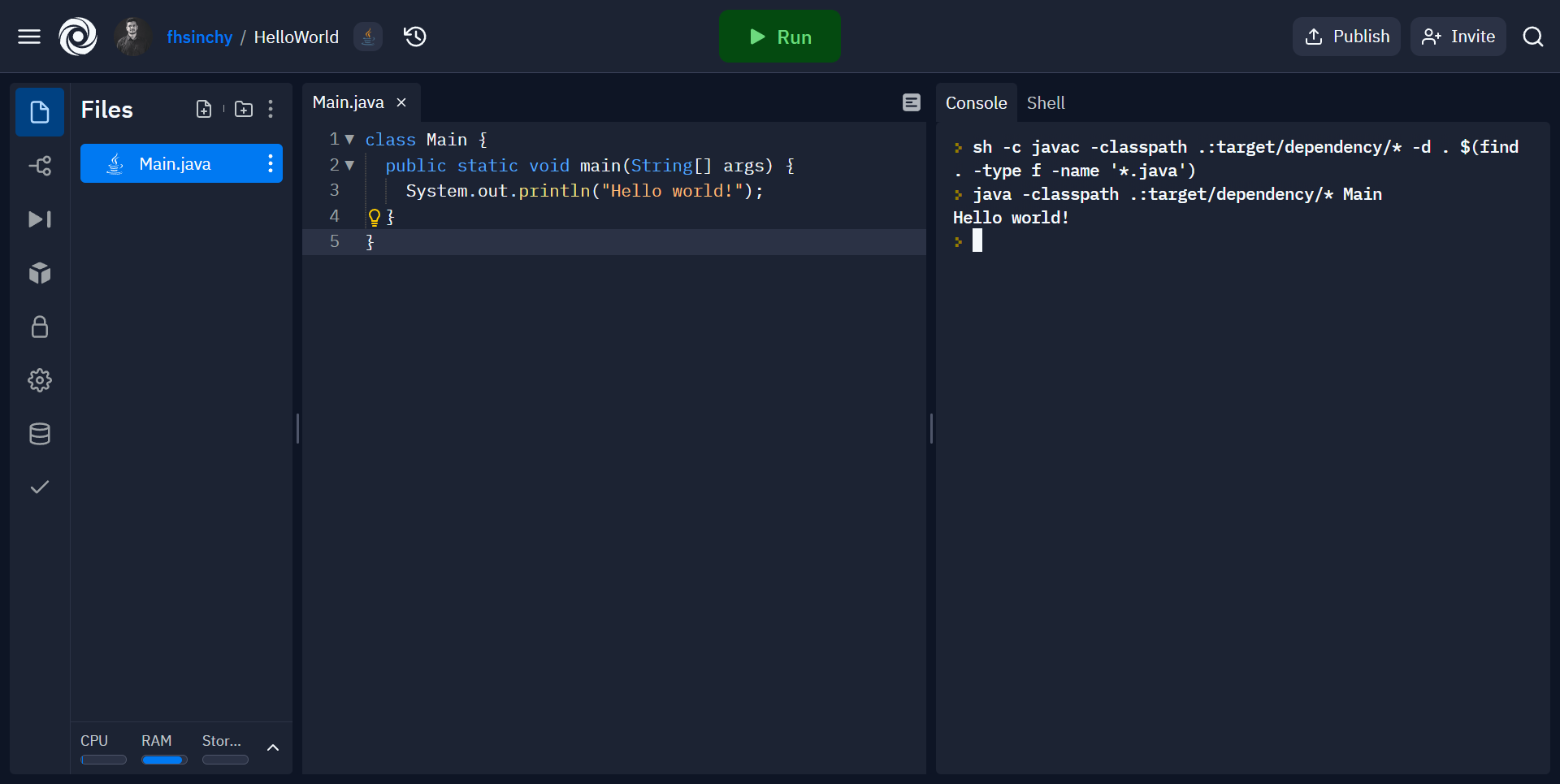
What’s Going On in the Code?
class Main { public static void main(String[] args) { System.out.println("Hello world!"); }}class Main { //...}Mainclass. A class groups together a bunch of related code within a single unit.publicclass, which means this class is accessible anywhere in the codebase. One Java source file (files with the .javaextension) can contain only one top level publicclass in it.Main.javacontains the mainclass in this project.
Main.classfile. This is called a bytecode. When you hit the Run button, the Java compiler compiled your code from the Main.javafile into this bytecode.class Main { public static void main(String[] args) { System.out.println("Hello world!"); }}class NotMain { public static void main(String[] args) { System.out.println("Not hello world!"); }}NotMainhas been added. Go ahead and hit the Runbutton once more while keeping your eyes on the Filesmenu.
NotMain.classhas showed up. This means that for every class you have within your entire codebase, the compiler will create a separate bytecode.class Main { public static void main(String[] args) { System.out.println("Hello world!"); }}public static void main (String[] args)function is special in Java. If you have experience with languages like C, C++ or Go, you should already know that every program in those languages has a main function. The execution of the program begins from this main function.public static void main (String[] args)otherwise it won't work. In fact, if you change it even a little bit Java will start to scream.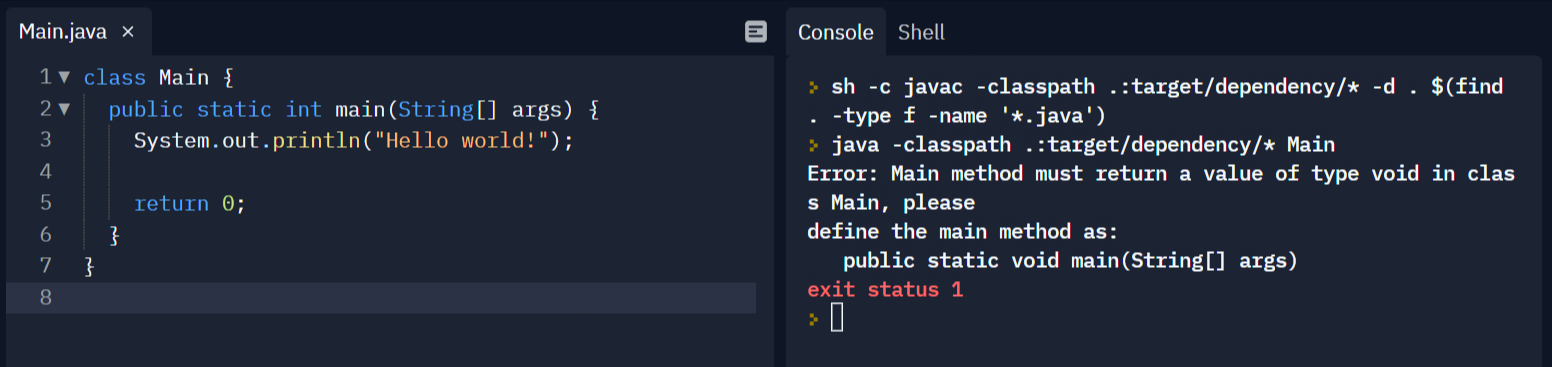
voidto intand the function now returns 0at the end. As you can see in the console, it says:Error: Main method must return a value of type void in class Main, please define the main method as: public static void main(String[] args)class Main { public static void main(String[] args) { System.out.println("Hello world!"); }}mainmethod is a publicmethod and the staticmeans, you can call it without instantiating its class.voidmeans that the function doesn't return any value and the String[] argsmeans that the function takes an array of strings as an argument. This array holds command line arguments passed to the program during execution.System.out.printlnprints out strings on the terminal. In the example above, "Hello world!"has been passed to the function, so you get Hello world!printed on the terminal.public classin a Java source file has to match the file name, and the main function of any Java program has to be defined as public static void main(String[] args).What is JVM?
What is JRE and JDK?
How to Setup Java on Your Computer

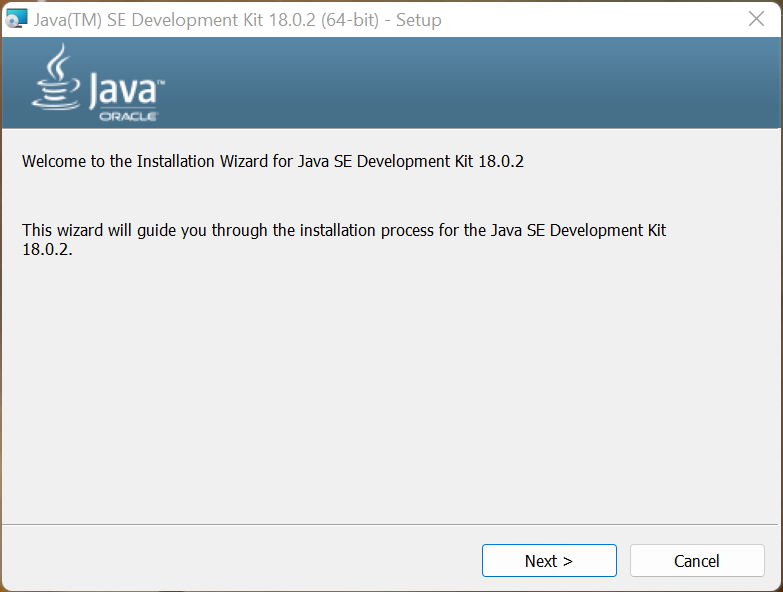
java --version# java 18.0.2 2022-07-19# Java(TM) SE Runtime Environment (build 18.0.2+9-61)# Java HotSpot(TM) 64-Bit Server VM (build 18.0.2+9-61, mixed mode, sharing)How to Install a Java IDE on Your Computer
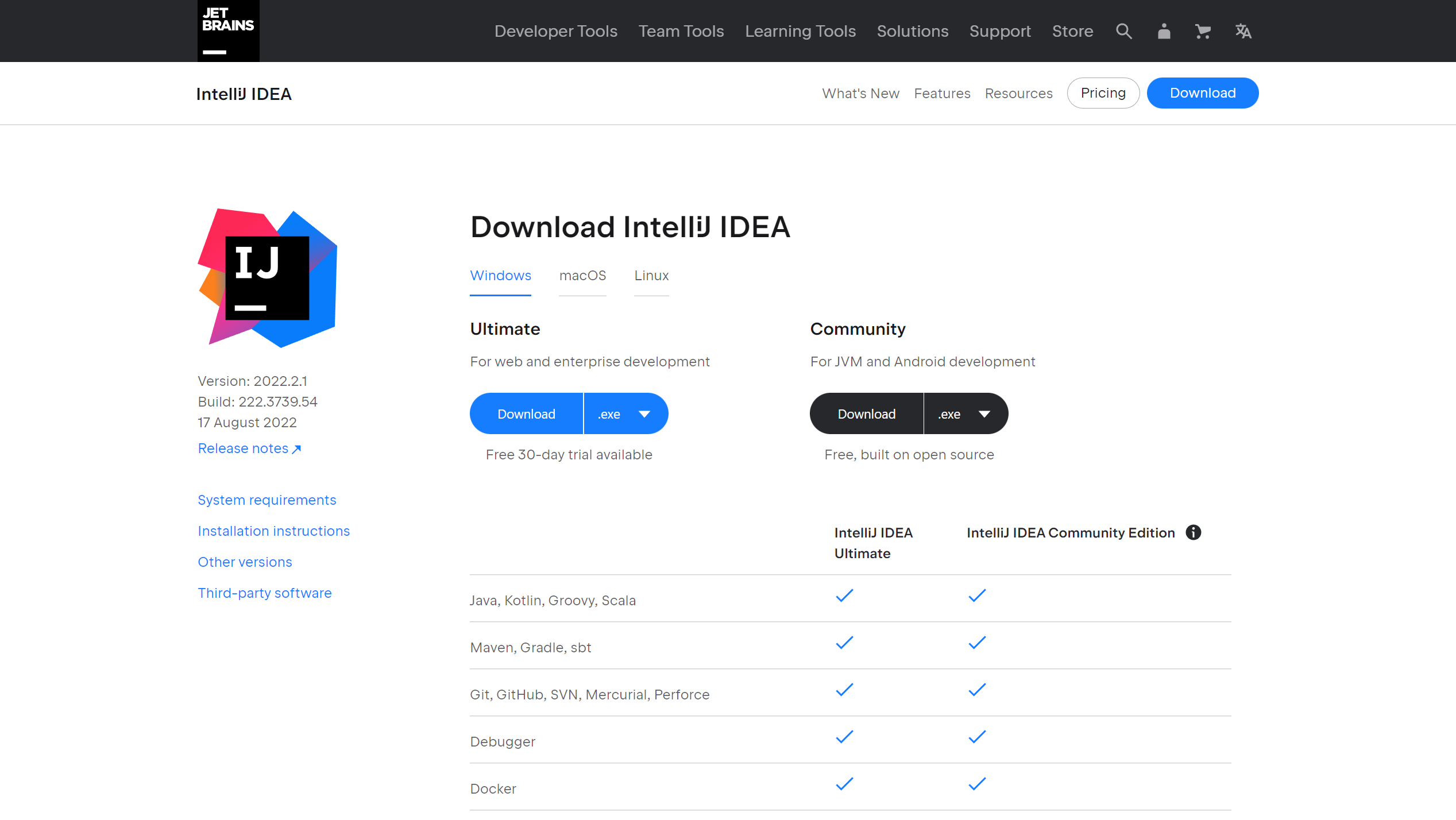
How to Create a New Project on IntelliJ IDEA


srcfolder.srcfolder and go to New > Java Class.
Mainfor your class and make sure Classis highlighted as the type.

public class Main { public static void main (String[] args) { System.out.println("Hello World!"); }}

HelloWorldprogram in IntelliJ IDEA.How to Work with Variables in Java
public class Main { public static void main(String[] args) { // <type> <name> int age; }}ageis a whole number, its type will be integer or intfor short, followed by the name of the variable ageand a semicolon.public class Main { public static void main(String[] args) { // <type> <name> int age; // <name> = <value> age = 27; // prints the age on the terminal System.out.println("I am " + age + " years old."); }}System.out.println();function call will print the line I am 27 years old.to the console. In case you're wondering, using a plus sign is one of the many ways to dynamically print out variables in the middle of a sentence.age = 27by putting two forward slashes in front of it and try to compile the code, the compiler will throw the following error message at you:Exception in thread "main" java.lang.Error: Unresolved compilation problem: The local variable age may not have been initialized at variables.Main.main(Main.java:13)The local variable age may not have been initializedindicates that the variable has not been initialized.public class Main { public static void main(String[] args) { // <type> <name> = <value> int age = 27; // prints the age on the terminal System.out.println("I am " + age + " years old."); }}public class Main { public static void main(String[] args) { int age = 27; // updates the value to be 28 instead of 27 age = 28; System.out.println("I am " + age + " years old."); }}agewill change from 27 to 28 because you're overwriting it just before printing.public class Main { public static void main(String[] args) { // <type> <name> = <value> int age = 27; int age = 28; // prints the age on the terminal System.out.println("I am " + age + " years old."); }}Exception in thread "main" java.lang.Error: Unresolved compilation problem: Duplicate local variable age at variables.Main.main(Main.java:9)Duplicate local variable ageindicates that the variable has already been declared.age = 27and it's not dynamically calculated. You've written the value directly in the source code. So ageis an integer literal.What Are the Rules for Declaring Variables?
ageand AGEare two different variables.firstName, lastNamef, lWhat Are
finalVariables?finalvariable in Java can be initialized only once. So if you declare a variable as final, you can not reassign it.public class Main { public static void main(String[] args) { // final <type> <name> = <value> final int age = 27; age = 28; System.out.println("I am " + age + " years old."); }}agevariable has been declared as final, the code will throw the following error message at you:Exception in thread "main" java.lang.Error: Unresolved compilation problem: The final local variable age cannot be assigned. It must be blank and not using a compound assignment at variables.Main.main(Main.java:9)public class Main { public static void main(String[] args) { // final <type> <name> final int age; age = 28; // prints the age on the terminal System.out.println("I am " + age + " years old."); }}finalwill limit your ability to reassign its value. If you leave it uninitialized, you'll be able to initialize it as usual.What are the Primitive Data Types in Java?
intis a primitive type and it stores an integer value.TYPE EXPLANATION byte8-bit signed integer within the range of -128 to 127 short16-bit signed integer within the range of -32,768 to 32,767 int32-bit signed integer within the range of -2147483648 to 2147483647 long64-bit signed integer within the range of -9223372036854775808 to 9223372036854775807 floatsingle-precision 32-bit floating point within the range of 1.4E-45 to 3.4028235E38 doubledouble-precision 64-bit floating point within the range of 4.9E-324 to 1.7976931348623157E308 booleanIt can be either trueor falsecharsingle 16-bit Unicode character within the range of \u0000(or 0) to \uffff(or 65,535 inclusive)byte, short, and longin the same way.doublealso works the same way, except you can assign a number with a decimal point instead of an integer:public class Main { public static void main(String[] args) { double gpa = 4.8; System.out.println("My GPA is " + gpa + "."); }}intto the double, such as 4instead of 4.8, the output will be 4.0instead of 4, because doublewill always have a decimal point.doubleand floatare similar, you may think that replacing the doublekeyword with floatwill convert this variable to a floating point number – but that's not correct. You'll have to append a for Fafter the value:public class Main { public static void main(String[] args) { float gpa = 4.8f; System.out.println("My GPA is " + gpa + "."); }}doublein Java. If you do not append the f, the compiler will think you're trying to assign a doublevalue to a floatvariable.booleandata can hold either trueor falsevalues.public class Main { public static void main(String[] args) { boolean isWeekend = false; System.out.println(isWeekend); // false }}falsecan be treated as a no and truecan be treated as a yes. chartype can hold any Unicode character within a certain range.public class Main { public static void main(String[] args) { char percentSign = '%'; System.out.println(percentSign); // % }}charvariable and printed it out on the terminal.public class Main { public static void main(String[] args) { char copyrightSymbol = '\u00A9'; System.out.println(copyrightSymbol); // © }}\u00A9and you can find more Unicode escape sequences on this website.int, double, boolean, and charmajority of the time.What is Type Conversion or Casting?
public class Main { public static void main(String[] args) { int number1 = 8; double number2 = number1; System.out.println(number2); // 8.0 }}Exception in thread "main" java.lang.Error: Unresolved compilation problem: Type mismatch: cannot convert from double to int at operators.Main.main(Main.java:7)
shortto a double, for example, skipping the others in between. package datatypes;public class Main { public static void main(String[] args) { double number1 = 8.5; int number2 = (int) number1; System.out.println(number2); // 8 }}(int)cast operator explicitly, you show the compiler who's boss.doublenumber from 8.5to just 8.0, you'll not lose any information. So whenever you're performing an explicit conversion, be careful.charto an intas follows:public class Main { public static void main(String[] args) { char character = 'F'; int number = character; System.out.println(number); // 70 }}70is the ASCII code for the character F– that's why the output was like this. If you'd like to learn more about ASCII codes, my colleague Kris Koishigawa has written an excellent article on the topic.
What are Wrapper Classes in Java?
Primitive Type Wrapper Class intIntegerlongLongshortShortbyteBytebooleanBooleancharCharacterfloatFloatdoubleDoublepublic class Main { public static void main (String[] args) { Integer age = 27; Double gpa = 4.8; System.out.println(age); // 27 System.out.println(gpa); // 4.8 }}age.intValue()will return the age as a primitive integer and the gpa.doubleValue()will return the GPA in a primitive double type.How to Use Operators in Java
What Are the Arithmetic Operators?
OPERATOR OPERATION +Addition -Subtraction *Multiplication /Division %Remainder (Modulo/Modulus) public class Main { public static void main(String[] args) { int number1 = 10; int number2 = 5; System.out.println(number1 + number2); // 15 System.out.println(number1 - number2); // 5 System.out.println(number1 * number2); // 50 System.out.println(number1 / number2); // 2 System.out.println(number1 % number2); // 0 }}%symbol. The result is 0because if you divide 10 by 2, there'll be nothing left (no remainder).public class Main { public static void main(String[] args) { int number1 = 8; int number2 = 5; System.out.println(number1 / number2); // 1 }}public class Main { public static void main(String[] args) { double number1 = 8; double number2 = 5; System.out.println(number1 / number2); // 1.6 }}What Are the Assignment Operators?
public class Main { public static void main(String[] args) { // <type> <name> = <value> int age = 27; // prints the age on the terminal System.out.println(age); }}=symbol to assign a value to a variable, it works as an assignment operator. But, this is not the only form of this operator.OPERATOR OPERATION EQUIVALENT TO +=a += ba = a + b-=a -= ba = a - b*=a *= ba = a * b/=a /= ba = a / b%=a %= ba = a % bpackage operators;public class Main { public static void main(String[] args) { double number1 = 10; double number2 = 5; number1 += number2; System.out.println(number1); // 15 }}What Are the Relational Operators?
trueor falsedepending on the operation you've performed.OPERATOR EXPLANATION USAGE ==Is Equal To 5 == 8returns false!=Is Not Equal To 5 != 8returns true>Is Greater Than 5 > 8returns false<Is Less Than 5 < 8returns true>=Greater Than or Equal To 5 >= 8returns false<=Less Than or Equal To 5 <= 8returns truepublic class Main { public static void main(String[] args) { double number1 = 10; double number2 = 5; System.out.println(number1 == number2); // false System.out.println(number1 != number2); // true System.out.println(number1 > number2); // true System.out.println(number1 < number2); // false System.out.println(number1 >= number2); // true System.out.println(number1 <= number2); // false }}public class Main { public static void main(String[] args) { char smallLetter = 'a'; char capitalLetter = 'A'; System.out.println(smallLetter > capitalLetter); // ??? }}What Are the Logical Operators?
can run the program if -> age >= 18 and age <= 40can borrow books if -> isSchoolStudent or isLibraryMemberOPERATOR USAGE EXPLANATION Logical And ( &&)age >= 18 && age <= 40Evaluates to true, only if both conditions are true Logical Or (` `) `isSchoolStudent isLibraryMember` Evaluates to true if one of the two or both conditions are true Not ( !)!isLibraryMemberEvaluates to false if the inner condition evaluates to true and vise versa andoperator:public class Main { public static void main(String[] args) { int age = 20; System.out.println(age >= 18 && age <= 40); // true }}&&operator. If and only if both conditions evaluate to true, the andoperation evaluates to true.false, the computer will not evaluate the rest of the conditions and return false. Because if the first one evaluates to false, then there is no way for the entire operation to evaluate to true.oroperator works similarly, but in this case, if any of the conditions are true then the entire operation will evaluate to true:public class Main { public static void main(String[] args) { boolean isSchoolStudent = true; boolean isLibraryMember = false; System.out.println(isSchoolStudent || isLibraryMember); // true }}oroperation evaluates to true, the computer will not evaluate the rest of the conditions and return true. Because if the first condition evaluates to truethe operation will evaluate to trueregardless of what the other conditions evaluate to.notoperator evaluates to the opposite of whatever its condition evaluates to. Take a look at the following code example:public class Main { public static void main(String[] args) { boolean isLibraryMember = true; System.out.println(isLibraryMember); // true System.out.println(!isLibraryMember); // false }}booleanvalue. The not operator is a unary operator, meaning it operates on a single operand.public class Main { public static void main(String[] args) { boolean isLibraryMember = true; boolean isSchoolStudent = false; System.out.println(!isSchoolStudent || isLibraryMember); // true }}isSchoolStudentinto true, so the operation evaluates to true. However, if you modify the code as follows:public class Main { public static void main(String[] args) { boolean isLibraryMember = true; boolean isSchoolStudent = false; System.out.println(!(isSchoolStudent || isLibraryMember)); // false }}true. The not operator will turn it into false.public class Main { public static void main(String[] args) { boolean isSchoolStudent = true; boolean isLibraryMember = false; int age = 10; System.out.println(isSchoolStudent || isLibraryMember && age > 18); // ??? }}What Are the Unary Operators?
OPERATOR EXPLANATION Increment ( ++)Increments a given value by 1 Decrement ( --)Decrements a given value by 1 public class Main { public static void main(String[] args) { int score = 95; int turns = 11; score++; turns--; System.out.println(score); // 96 System.out.println(turns); // 10 }}public class Main { public static void main(String[] args) { int score = 95; int turns = 11; ++score; --turns; System.out.println(score); // 96 System.out.println(turns); // 10 }}package operators;public class Main { public static void main(String[] args) { int score = 95; System.out.println(++score); // 96 System.out.println(score); // 96 }}package operators;public class Main { public static void main(String[] args) { int score = 95; System.out.println(score++); // 95 System.out.println(score); // 96 }}How to Work with Strings in Java
Stringtype in Java is one of the most commonly used reference types. It's a collection of characters that you can use to form lines of text in your program.public class Main { public static void main(String[] args) { String name = "Farhan"; System.out.println("My name is " + name + "."); }}Stringthis way is not very different from declaring the primitive types in Java.Stringis by using the newoperator.public class Main { public static void main(String[] args) { // <type> <name> = new <type>(<value>) String name = new String("Farhan"); System.out.println("My name is " + name + "."); }}Stringin the literal way, the JVM first checks if that Stringalready exists in the pool. If it does, JVM will reuse it. If it doesn't, then the JVM will create it.newoperator, the JVM will always create a new Stringobject no matter what. The following program demonstrates this concept clearly:public class Main { public static void main(String[] args) { String literalString1 = "abc"; String literalString2 = "abc"; String objectString1 = new String("abc"); String objectString2 = new String("abc"); System.out.println(literalString1 == literalString2); System.out.println(objectString1 == objectString2); }}==operator is used for checking equality. The output of this program will be:truefalseabcwas already in the string pool, the literalString2variable reuses that. In case of the object strings however, both of them are different entities.How to Format a String
+operator to sew strings together or format them in a specific way.String.format()method.public class Main { public static void main(String[] args) { String name = "Farhan"; int age = 27; String formattedString = String.format("My name is %s and I'm %d years old.", name, age); System.out.println(formattedString); }}%s, and %dcharacters are format specifiers. They're responsible for telling the compiler that this part of the string will be replaced with something.%swith the nameand the %dwith the age. The order of the specifiers needs to match the order of the arguments and the arguments need to match the type of the specifier.%sand %dare not random. They are specific for string data and decimal integers. A chart of the commonly used specifiers are as follows:Specifier Data Type %b, %BBoolean %s, %SString %c, %CUnicode Character %dDecimal Integer %fFloating Point Numbers %ofor octal integers, %xor %Xfor hexadecimal numbers, and %eor %Efor scientific notations. But since, we won't discuss them in this book, I've left them out.%sand %dspecifiers you saw, you can use any of these specifiers for their corresponding data type. And just in case you're wondering, that %fspecifier works for both floats and doubles.How to Get the Length of a String or Check if It's Empty or Not
length()method that returns the length of that string. It's like the lengthproperty for arrays.public class Main { public static void main(String[] args) { String name = "Farhan"; System.out.println(String.format("Length of this string is: %d.", name.length())); // 6 }}isEmpty()method. Like the length()method, it also comes with every string object.public class Main { public static void main(String[] args) { String name = "Farhan"; if (name.isEmpty()) { System.out.println("There is no name mentioned here"); } else { System.out.println(String.format("Okay, I'll take care of %s.", name)); } }}How to Split and Join Strings
split()method can split a string based on a regular expression.import java.util.Arrays;public class Main { public static void main(String[] args) { String name = "Farhan Hasin Chowdhury"; System.out.println(Arrays.toString(name.split(" "))); }}Farhan Hasin Chowdhuryat each space. So the output will be [Farhan, Hasin, Chowdhury].public class Main { public static void main(String[] args) { String name = "Farhan Hasin Chowdhury"; String substrings[] = name.split(" "); String joinedName = String.join(" ", substrings); System.out.println(joinedName); // Farhan Hasin Chowdhury }}join()method can also help you in joining multiple strings together outside of an array.public class Main { public static void main(String[] args) { System.out.println(String.join(" ", "Farhan", "Hasin", "Chowdhury")); // Farhan Hasin Chowdhury }}How to Convert a String to Upper or Lowercase
toUpperCase()and toLowerCase()methods to perform the tasks:public class Main { public static void main(String[] args) { String name = "Farhan Hasin Chowdhury"; System.out.println(name.toUpperCase()); // FARHAN HASIN CHOWDHURY System.out.println(name.toLowerCase()); // farhan hasin chowdhury }}How to Compare Two Strings
=operator.equals()method checks whether two strings are equal or not and the equalsIgnoreCase()method ignores their casing when comparing.public class Main { public static void main(String[] args) { String name = "Farhan Hasin Chowdhury"; String nameUpperCase = name.toUpperCase(); System.out.println(name.equals(nameUpperCase)); // false System.out.println(name.equalsIgnoreCase(nameUpperCase)); // true }}How to Replace Characters or Substrings in a String
replace()method can replace characters or entire substrings from a given string.package strings;public class Main { public static void main(String[] args) { String loremIpsumStd = "Sed ut perspiciatis unde omnis iste natus error sit voluptatem accusantium doloremque laudantium, totam rem aperiam, eaque ipsa quae ab illo inventore veritatis et quasi architecto beatae vitae dicta sunt explicabo."; System.out.println(String.format("Standard lorem ipsum text: %s", loremIpsumStd)); String loremIpsumHalfTranslated = loremIpsumStd.replace("Sed ut perspiciatis unde omnis iste natus error sit voluptatem accusantium doloremque laudantium", "But I must explain to you how all this mistaken idea of denouncing pleasure and praising pain was born and I will give you a complete account of the system"); System.out.println(String.format("Translated lorem ipsum text: %s", loremIpsumHalfTranslated)); }}loremIpsumStdstring contains a portion of the original lorem ipsum text. Then you're replacing the first line of that string and saving the new string in the loremIpsumHalfTranslatedvariable.How to Check If a String Contains a Substring or Not
contains()method can check whether a given string contains a certain substring or not.public class Main { public static void main(String[] args) { String lyric = "Roses are red, violets are blue"; if (lyric.contains("blue")) { System.out.println("The lyric has the word blue in it."); } else { System.out.println("The lyric doesn't have the word blue in it."); } }}What Are the Different Ways of Inputting and Outputting Data?
System.out.println()method to print out information on the terminal. You've also learned about the String.format()method in a previous section.System.out.println()method. You'll also learn about taking input from the user.import java.util.Scanner;public class Main { public static void main(String[] args) { Scanner scanner = new Scanner(System.in); System.out.print("What's your name? "); String name = scanner.nextLine(); System.out.printf("So %s. How old are you? ", name); int age = scanner.nextInt(); System.out.printf("Cool! %d is a good age to start programming.", age); scanner.close(); }}java.util.Scannerclass is necessary for taking user inputs. You can bring the class to your program using the importkeyword.Scannerclass using the newkeyword. While creating the new instance, you'll have to let it know your desired input stream.System.instream is the standard input and output stream.nextLine()for taking string input, nextInt()for taking integer input, nextDouble()for taking double input and so on.scanner.nextLine()method will ask for a string from the user and return the given input with a newline character appended.scanner.nextInt()method will ask for an integer and return the given number from the user.System.out.printf()method for the first time here. Well, apart from the System.out.println()method, there is also the System.out.print()method that prints out a given string without appending a newline character to it.System.out.printf()is kind of a combination of the System.out.print()and String.format()methods. You can use the previously discussed format specifiers in this method as well.scanner.close()method.import java.util.Scanner;public class Main { public static void main(String[] args) { Scanner scanner = new Scanner(System.in); System.out.print("What's your name? "); String name = scanner.nextLine(); System.out.printf("So %s. How old are you? ", name); int age = scanner.nextInt(); System.out.printf("Cool! %d is a good age to start programming. \nWhat language would you prefer? ", age); String language = scanner.nextLine(); System.out.printf("Ah! %s is a solid programming language.", language); scanner.close(); }}scanner.nextLine()statement after the scanner.nextInt()method call. Will it work?scanner.nextInt(). If you use scanner.nextLine()after any of the other nextWhatever()methods, you'll face this issue.scanner.nextInt()method, it consumes the integer and leaves the newline character in the input buffer.scanner.nextLine()is invoked, it consumes that newline character as the end of the input. The easiest solution to this problem is writing an additional scanner.nextLine()call after the other scanner method calls.import java.util.Scanner;public class Main { public static void main(String[] args) { Scanner scanner = new Scanner(System.in); System.out.print("What's your name? "); String name = scanner.nextLine(); System.out.printf("So %s. How old are you? ", name); int age = scanner.nextInt(); // consumes the dangling newline character scanner.nextLine(); System.out.printf("Cool! %d is a good age to start programming. \nWhat language would you prefer? ", age); String language = scanner.nextLine(); System.out.printf("Ah! %s is a solid programming language.", language); scanner.close(); }}How to Use Conditional Statements in Java
ifstatement as follows:public class Main { public static void main(String[] args) { int age = 20; // if (condition) { ...} if (age >= 18 && age <= 40) { System.out.println("you can use the program"); } }}ifand then there is the condition inside a pair of parenthesis. If the condition evaluates to true, the code within the curly braces will be executed.ageto 50the print statement will not be executed and there'll be no output on the console. For these kind of situations where the condition evaluates to false, you can add an elseblock:public class Main { public static void main(String[] args) { int age = 20; if (age >= 18 && age <= 40) { System.out.println("you can use the program"); } else { System.out.println("you can not use the program"); } }}false, the code within the elseblock will execute and you'll see you can not use the programprinted on your terminal.if-else if-elseladder:public class Main { public static void main(String[] args) { int age = 50; boolean isSchoolStudent = true; boolean isLibraryMember = false; // if (condition) { ...} if (age >= 18 && age <= 40) { System.out.println("you can use the program"); } else if (isSchoolStudent || isLibraryMember) { System.out.println("you can use the program for a short time"); } else { System.out.println("you can not use the program"); } }}falsethen the second condition will be tested. If the second one evaluates to truethen the code within curly braces will be executed. If the conditions in both ifstatements evaluate to false, then the elseblock will be executed.ifstatements within other ifstatements as follows:package operators;public class Main { public static void main(String[] args) { int age = 20; if (age >= 18 && age <= 40) { boolean isSchoolStudent = true; boolean isLibraryMember = false; if (isSchoolStudent || isLibraryMember) { System.out.println("you can use the program"); } } else { System.out.println("you can not use the program"); } }}ifstatement evaluates to true will the inner ifstatement be tested.What is a switch-case statement?
import java.util.Scanner;public class Main { public static void main(String[] args) { Scanner scanner = new Scanner(System.in); System.out.print("What is the first operand? "); int a =scanner.nextInt(); // consumes the dangling newline character scanner.nextLine(); System.out.print("What is the second operand? "); int b = scanner.nextInt(); // consumes the dangling newline character scanner.nextLine(); System.out.print("What operation would you like to perform? "); String operation = scanner.nextLine(); switch (operation) { case "sum": System.out.printf("%d + %d = %d", a, b, a+b); break; case "sub": System.out.printf("%d - %d = %d", a, b, a-b); break; case "mul": System.out.printf("%d * %d = %d", a, b, a*b); break; case "div": if (b == 0) { System.out.print("Can't divide by zero!"); } else { System.out.printf("%d / %d = %d", a, b, a / b); } break; default: System.out.printf("Invalid Operation!"); } scanner.close(); }}case "sum", the program checks whether the value of the switch or the operationvariable in this is sumor not.defaultcase will be executed. breakstatement. It does what it sounds like: stops the program from going into the next case.breakstatements, all the cases will be executed one after the other until the defaultcase has been reached.What is Variable Scope in Java?
public class Main { public static void main(String[] args) { int age = 20; if (age >= 18 && age <= 40) { // age variable is accessible here // booleans are not accessible here boolean isSchoolStudent = true; boolean isLibraryMember = false; if (isSchoolStudent || isLibraryMember) { // booleans are accessible here // age variable is accessible here System.out.println("you can use the program"); } } else { // age variable is accessible here // booleans are not accessible here System.out.println("you can not use the program"); } }}agevariable is declared within the classcode block. That means you can access this variable within the entire class without any issue. Since the variable is accessible in the entire class instance, it's an instance variable.isSchoolStudentand isLibraryMembervariables have been declared within the first ifstatement code block. So it'll not be accessible outside of that code block.ifblock. These are called local variables.statickeyword but you'll learn about them in the object-oriented programming sections.What Are Default Values of Variables in Java?
public class Main { // gets 0 as the value by default static int age; public static void main(String[] args) { System.out.println(age); // 0 }}mainmethod is static, it can only access staticvariables in the class level. I'll discuss staticin greater detail in the object-oriented programming section.mainmethod, it becomes local to that method and doesn't get any default value.public class Main { public static void main(String[] args) { // remains uninitialized int age; System.out.println(age); // fails to compile }}The local variable age may not have been initializederror on compilation.0or null. I'm giving a list of all the primitive types and their default values:Data Type Default Value byte0short0int0long0Lfloat0.0fdouble0.0dchar'\u0000'booleanfalsenullby default. We'll discuss reference types, classes, and objects in the object-oriented programming sections.How to Work with Arrays in Java
public class Main { public static void main(String[] args) { // <type> <name>[] = new <type>[<length>] char vowels[] = new char[5]; }}charin this case. Then you write out the name of the array, vowelsfollowed by a pair of square braces here. This pair of braces tells Java that you're declaring an array of characters and not a regular character variable.newoperator used for creating new objects in Java. Since arrays are reference types in Java, newis required to create new instances.5means the array will hold five elements and not more than that.0as its index and not 1.vowelsfollowed by a pair of square braces enclosing your desired index. So if you want to access the first element in the array, you can do so as follows:public class Main { public static void main(String[] args) { char vowels[] = new char[5]; vowels[0] = 'a'; }}vowels[0]is similar to a regular character variable. You can print it out, assign new value to it, perform calculations in case of number types, and so on. ato the first index. You can assign the rest of the vowels to the rest of the indices as follows:public class Main { public static void main(String[] args) { char vowels[] = new char[5]; vowels[0] = 'a'; vowels[1] = 'e'; vowels[2] = 'i'; vowels[3] = 'o'; vowels[4] = 'u'; }}0they'll end at the length of the array - 1, which in this case is 4. If you try to assign another element to the array like vowels[4] = 'x';the compiler will throw the following error:Exception in thread "main" java.lang.ArrayIndexOutOfBoundsException: Index 5 out of bounds for length 5 at arrays.Main.main(Main.java:18)import java.util.Arrays;public class Main { public static void main(String[] args) { char vowels[] = new char[5]; vowels[0] = 'a'; vowels[1] = 'e'; vowels[2] = 'i'; vowels[3] = 'o'; vowels[4] = 'u'; System.out.println("These are the vowels: " + Arrays.toString(vowels)); }}java.util.Arrays;and use the Arrays.toString()method to convert the array to a string. This class has a bunch of other interesting methods, but before discussing them, I'd like to show you how you can declare and initialize an array in one go.import java.util.Arrays;public class Main { public static void main(String[] args) { char vowels[] = { 'a', 'e', 'i', 'o', 'u'}; System.out.println("These are the vowels: " + Arrays.toString(vowels)); }}newyou write out the individual array elements separated by comma and enclosed within a pair of curly braces.lengthproperty.vowels.lengthwill be 5since there are five elements in the array. The lengthproperty is an integer and is present in every array in Java.

0means no and 1means yes.import java.util.Arrays;public class Main { public static void main(String[] args) { int medicineRoutine[][] = { { 1, 2, 3, 4, 5, 6, 7}, { 0, 1, 1, 0, 1, 1, 0}, { 1, 0, 1, 0, 1, 0, 0}, { 0, 0, 1, 1, 0, 1, 0}, }; System.out.println(Arrays.deepToString(medicineRoutine)); // [[1, 2, 3, 4, 5, 6, 7], [0, 1, 1, 0, 1, 1, 0], [1, 0, 1, 0, 1, 0, 0], [0, 0, 1, 1, 0, 1, 0]] }}Arrays.toString()method, you have to dig deeper.import java.util.Arrays;public class Main { public static void main(String[] args) { int medicineRoutine[][] = { { 1, 2, 3, 4, 5, 6, 7}, { 0, 1, 1, 0, 1, 1, 0}, { 1, 0, 1, 0, 1, 0, 0}, { 0, 0, 1, 1, 0, 1, 0}, }; System.out.println(Arrays.deepToString(medicineRoutine).replace("], ", "]\n")); }}// [[1, 2, 3, 4, 5, 6, 7]// [0, 1, 1, 0, 1, 1, 0]// [1, 0, 1, 0, 1, 0, 0]// [0, 0, 1, 1, 0, 1, 0]]replace()method for strings. You're just replacing the ending square brace in each line with a square brace and a newline character.medicineRoutine[2][3]will select the element in index 3of the third array. That element will be 0. Working with multidimensional array can seem a bit tricky but practicing will make it much easier. How to Sort an Array
java.utils.Arrayscomes with the Arrays.sort()method to do just that:import java.util.Arrays;public class Main { public static void main(String[] args) { char vowels[] = { 'e', 'u', 'o', 'i', 'a'}; Arrays.sort(vowels); System.out.println("The sorted array: " + Arrays.toString(vowels)); // [a, e, i, o , u] }}Arrays.sort()method takes the unsorted array as its argument and sorts it in place. So instead of getting a new sorted array in return, your original array itself will be sorted in ascending order.u, o, iin ascending order and leave e, aas is, you can do so as follows:import java.util.Arrays;public class Main { public static void main(String[] args) { char vowels[] = { 'e', 'u', 'o', 'i', 'a'}; int startIndex = 1; int endIndex = 4; Arrays.sort(vowels, startIndex, endIndex); System.out.println("The sorted array: " + Arrays.toString(vowels)); // [e, i, o, u , a] }}How to Perform Binary Search on an Array
Arrays.binarySearch()method lets you search for items in a sorted array using the binary search algorithm.public class Main { public static void main(String[] args) { char vowels[] = { 'a', 'e', 'i', 'o', 'u'}; char key = 'i'; int foundItemIndex = Arrays.binarySearch(vowels, key); System.out.println("The vowel 'i' is at index: " + foundItemIndex); // 2 }}Arrays.binarySearch()method takes an array as its first parameter and the the search key (aka the item you're looking for) as its second parameter. It'll return the index of the found item as an integer.intand use that to access the element from the array as vowels[foundItemIndex].Arrays.sort()method to sort it first.2to index 4, you can do so as follows:import java.util.Arrays;public class Main { public static void main(String[] args) { char vowels[] = { 'a', 'e', 'i', 'o', 'u'}; char key = 'i'; int startIndex = 2; int endIndex = 4; int foundItemIndex = Arrays.binarySearch(vowels, startIndex, endIndex, key); System.out.println("The vowel 'i' is at index: " + foundItemIndex); // 2 }}i, o, and u. So if you look for a, it'll not be found. In cases where the given item is not found, you'll get a negative index. The resultant negative index will vary based on a number of factors but I won't get into those here. If you're interested in learning more, check out my article on the topic.How to Fill an Array
Arrays.fill()method can do that for you:import java.util.Arrays;public class Main { public static void main(String[] args) { char vowels[] = { 'e', 'u', 'o', 'i', 'a'}; Arrays.fill(vowels, 'x'); System.out.println("The filled array: " + Arrays.toString(vowels)); // [x, x, x, x, x] }}Arrays.sort()method, Arrays.fill()also performs its operation in place. It takes your array as the first parameter, the value you want to fill the array with as the second parameter, and updates the original array in place.import java.util.Arrays;public class Main { public static void main(String[] args) { char vowels[] = { 'e', 'u', 'o', 'i', 'a'}; int startIndex = 1; int endIndex = 4; Arrays.fill(vowels, startIndex, endIndex, 'x'); System.out.println("The filled array: " + Arrays.toString(vowels)); // [e, x, x, x, a] }}How to Make Copies of an Array
import java.util.Arrays;public class Main { public static void main(String[] args) { int oddNumbers[] = { 1, 3, 5}; int copyOfOddNumbers[] = oddNumbers; Arrays.fill(oddNumbers, 0); System.out.println("The copied array: " + Arrays.toString(copyOfOddNumbers)); // [0, 0, 0] }}Arrays.copyOf()method as follows:import java.util.Arrays;public class Main { public static void main(String[] args) { int oddNumbers[] = { 1, 3, 5}; int copyOfOddNumbers[] = Arrays.copyOf(oddNumbers, oddNumbers.length); Arrays.fill(oddNumbers, 0); System.out.println("The copied array: " + Arrays.toString(copyOfOddNumbers)); // [1, 3, 5] }}lengthproperty.Arrays.copyOfRange()that can copy a portion of an array to a new one:import java.util.Arrays;public class Main { public static void main(String[] args) { int oddNumbers[] = { 1, 3, 5, 7, 9, 11, 13, 15}; int startIndex = 2; int endIndex = 7; int copyOfOddNumbers[] = Arrays.copyOfRange(oddNumbers, startIndex, endIndex); System.out.println("The copied array: " + Arrays.toString(copyOfOddNumbers)); // [5, 7, 9, 11, 13] }}import java.util.Arrays;public class Main { public static void main(String[] args) { int oddNumbers[] = { 1, 3, 5, 7, 9, 11, 13, 15}; int startIndex = 2; int endIndex = oddNumbers.length; int copyOfOddNumbers[] = Arrays.copyOfRange(oddNumbers, startIndex, endIndex); System.out.println("The copied array: " + Arrays.toString(copyOfOddNumbers)); // [5, 7, 9, 11, 13, 15] }}How to Compare Two Arrays
public class Main { public static void main(String[] args) { int oddNumbers1[] = { 1, 3, 5, 7, 9, 11, 13, 15}; int oddNumbers2[] = { 1, 3, 5, 7, 9, 11, 13, 15}; System.out.println(oddNumbers1 == oddNumbers2); // false }}false. Since arrays are reference types, the relational operator will check whether they are the same instance or not.Arrays.equals()method:import java.util.Arrays;public class Main { public static void main(String[] args) { int oddNumbers1[] = { 1, 3, 5, 7, 9, 11, 13, 15}; int oddNumbers2[] = { 1, 3, 5, 7, 9, 11, 13, 15}; System.out.println(Arrays.equals(oddNumbers1, oddNumbers2)); // true }}falsesince the arrays will not remain identical anymore.Arrays.deepEquals()method instead of the regular one.import java.util.Arrays;public class Main { public static void main(String[] args) { int medicineRoutine[][] = { { 1, 2, 3, 4, 5, 6, 7}, { 0, 1, 1, 0, 1, 1, 0}, { 1, 0, 1, 0, 1, 0, 0}, { 0, 0, 1, 1, 0, 1, 0}, }; int medicineRoutine2[][] = { { 1, 2, 3, 4, 5, 6, 7}, { 0, 1, 1, 0, 1, 1, 0}, { 1, 0, 1, 0, 1, 0, 0}, { 0, 0, 1, 1, 0, 1, 0}, }; System.out.println(Arrays.deepEquals(medicineRoutine, medicineRoutine2)); // true }}java.util.Arraysclass. You can consult the official documentation if you'd like to learn more.How to Use Loops in Java
forloops, for...eachloops, and whileloops.For Loop

public class Main { public static void main(String[] args) { for (int number = 0; number <= 10; number++) { System.out.println(number); } }}// 0// 1// 2// 3// 4// 5// 6// 7// 8// 9// 10
numberwith the initial value of 0.numberis less than or equal to 10or not.10, you execute the statement inside the loop block and print out the number on the terminal.numbervariable becomes 11, the loop ends.public class Main { public static void main(String[] args) { int fibonacciNumbers[] = { 0, 1, 1, 2, 3, 5, 8, 13, 21, 34, 55}; for(int index = 0; index < fibonacciNumbers.length; index++) { System.out.println(fibonacciNumbers[index]); } }}
public class Main { public static void main(String[] args) { int number = 5; for (int multiplier = 1; multiplier <= 10; multiplier++) { System.out.println(String.format("%d x %d = %d", number, multiplier, number * multiplier)); } }}// 5 x 1 = 5// 5 x 2 = 10// 5 x 3 = 15// 5 x 4 = 20// 5 x 5 = 25// 5 x 6 = 30// 5 x 7 = 35// 5 x 8 = 40// 5 x 9 = 45// 5 x 10 = 50public class Main { public static void main(String[] args) { for (int number = 1; number <= 10; number++) { System.out.println(String.format("\nmultiplication table of %d", number)); for (int multiplier = 1; multiplier <= 10; multiplier++) { System.out.println(String.format("%d x %d = %d", number, multiplier, number * multiplier)); } } }}For-Each Loop
public class Main { public static void main(String[] args) { int fibonacciNumbers[] = { 0, 1, 1, 2, 3, 5, 8, 13, 21, 34, 55}; for(int number : fibonacciNumbers) { System.out.println(number); } }}While Loop

public class Main { public static void main(String[] args) { int number = 5; int multiplier = 1; while (multiplier <= 10) { System.out.println(String.format("%d x %d = %d", number, multiplier, number*multiplier)); multiplier++; } }}// 5 x 1 = 5// 5 x 2 = 10// 5 x 3 = 15// 5 x 4 = 20// 5 x 5 = 25// 5 x 6 = 30// 5 x 7 = 35// 5 x 8 = 40// 5 x 9 = 45// 5 x 10 = 50Do-While Loop

public class Main { public static void main(String[] args) { int number = 5; int multiplier = 1; do { System.out.println(String.format("%d x %d = %d", number, multiplier, number*multiplier)); multiplier++; } while (multiplier <= 10); }}// 5 x 1 = 5// 5 x 2 = 10// 5 x 3 = 15// 5 x 4 = 20// 5 x 5 = 25// 5 x 6 = 30// 5 x 7 = 35// 5 x 8 = 40// 5 x 9 = 45// 5 x 10 = 50How to Work with Array Lists in Java
ArrayListclass in Java mitigates this limitation.import java.util.ArrayList;public class Main { public static void main (String[] args) { ArrayList<Integer> oddNumbers = new ArrayList<>(); oddNumbers.add(1); oddNumbers.add(3); oddNumbers.add(5); oddNumbers.add(7); oddNumbers.add(9); System.out.println(oddNumbers.toString()); // [1, 3, 5, 7, 9] }}java.util.ArrayListclass at the top of your source file.ArrayListand then inside a pair of less than-greater than signs, you'll write the data type for the elements. Then you'll add the name of the array list itself followed by the assignment operator and new ArrayList<>().get()method:import java.util.ArrayList;public class Main { public static void main (String[] args) { ArrayList<Integer> oddNumbers = new ArrayList<>(); oddNumbers.add(1); oddNumbers.add(3); oddNumbers.add(5); oddNumbers.add(7); oddNumbers.add(9); System.out.println(oddNumbers.get(2)); // 5 }}get()method will get the value in the given index. Just like get()you can use the set()method to update the value of an element.import java.time.LocalDate;import java.util.ArrayList;public class Main { public static void main (String[] args) { ArrayList<Integer> oddNumbers = new ArrayList<>(); oddNumbers.add(1); oddNumbers.add(3); oddNumbers.add(5); oddNumbers.add(7); oddNumbers.add(9); oddNumbers.set(2, 55); System.out.println(oddNumbers.get(2)); // 55 }}set()method is the index and the second one is the updated value.lengthproperty like in an array but you can use the size()method on any array list to find out its length.import java.util.ArrayList;public class Main { public static void main (String[] args) { ArrayList<Integer> oddNumbers = new ArrayList<>(); oddNumbers.add(1); oddNumbers.add(3); oddNumbers.add(5); oddNumbers.add(7); oddNumbers.add(9); System.out.println(oddNumbers.size()); // 5 }}import java.util.ArrayList;public class Main { public static void main (String[] args) { ArrayList<Integer> oddNumbers = new ArrayList<>(); oddNumbers.add(1); oddNumbers.add(3); oddNumbers.add(5); oddNumbers.add(7); oddNumbers.add(9); oddNumbers.remove(Integer.valueOf(7)); oddNumbers.remove(Integer.valueOf(9)); System.out.println(oddNumbers.toString()); // [1, 3, 5] }}remove()method can remove an element by value or by index. If you pass a primitive integer value to the method, it'll remove the element in the given index.valueOf()method is present in all wrapper classes and it can convert a primitive value to a reference type.How to Add or Remove Multiple Elements
add()and remove()methods. There are two other methods addAll()and removeAll()for working with multiple elements.import java.util.ArrayList;public class Main { public static void main (String[] args) { ArrayList<Integer> oddNumbers = new ArrayList<>(); oddNumbers.add(1); oddNumbers.add(3); oddNumbers.add(5); ArrayList<Integer> moreOddNumbers = new ArrayList<>(); moreOddNumbers.add(7); moreOddNumbers.add(9); moreOddNumbers.add(11); oddNumbers.addAll(moreOddNumbers); // [1, 3, 5, 7, 9, 11] System.out.println(oddNumbers.toString()); oddNumbers.removeAll(moreOddNumbers); System.out.println(oddNumbers.toString()); // [1, 3, 5] }}addAll()method. removeAll()method and the array list goes back to its original state.clear()method:import java.util.ArrayList;public class Main { public static void main (String[] args) { ArrayList<Integer> oddNumbers = new ArrayList<>(); oddNumbers.add(1); oddNumbers.add(3); oddNumbers.add(5); oddNumbers.clear(); System.out.println(oddNumbers.toString()); // [] }}How to Remove Elements Based on a Condition
removeIf()method can remove elements from an array list if they meet a certain condition:import java.util.ArrayList;public class Main { public static void main (String[] args) { ArrayList<Integer> numbers = new ArrayList<>(); for (int i = 0; i <= 10; i++) { numbers.add(i); } System.out.println(numbers.toString()); // [0, 1, 2, 3, 4, 5, 6, 7, 8, 9, 10] numbers.removeIf(number -> number % 2 == 1); System.out.println(numbers.toString()); // [0, 2, 4, 6, 8, 10] }}removeIf()method will loop over the array list and pass each element to the lambda expression as the value of the numbervariable.trueor falsebased on that.true, the removeIf()method will keep the value. Otherwise the value will be deleted.How to Clone and Compare Array Lists
clone()method.import java.util.ArrayList;public class Main { public static void main (String[] args) { ArrayList<Integer> numbers = new ArrayList<>(); for (int i = 0; i <= 10; i++) { numbers.add(i); } ArrayList<Integer> numbersCloned = (ArrayList<Integer>)numbers.clone(); System.out.println(numbersCloned.equals(numbers)); // true }}clone()method returns an object, so you'll have to cast it to a proper array list manually. You can compare two array lists using the equals()method just like in arrays.How to Check if an Element Is Present or the Array List Is Empty
contains()method to check if an array list contains a given element or not:import java.util.ArrayList;public class Main { public static void main (String[] args) { ArrayList<Integer> oddNumbers = new ArrayList<>(); oddNumbers.add(1); oddNumbers.add(3); oddNumbers.add(5); oddNumbers.add(7); oddNumbers.add(9); System.out.println(oddNumbers.isEmpty()); // false System.out.println(oddNumbers.contains(5)); // true }}isEmpty()method on it and you'll get a boolean in return.How to Sort an Array List
sort()method:import java.util.ArrayList;import java.util.Comparator;public class Main { public static void main (String[] args) { ArrayList<Integer> oddNumbers = new ArrayList<>(); oddNumbers.add(5); oddNumbers.add(7); oddNumbers.add(1); oddNumbers.add(9); oddNumbers.add(3); System.out.println(oddNumbers.toString()); [5, 7, 1, 9, 3] oddNumbers.sort(Comparator.naturalOrder()); System.out.println(oddNumbers.toString()); [1, 3, 5, 7, 9] }}sort()method takes a comparator as its parameter. A comparator imposes the order of sorting on the array list.import java.util.ArrayList;import java.util.Comparator;public class Main { public static void main (String[] args) { ArrayList<Integer> oddNumbers = new ArrayList<>(); oddNumbers.add(5); oddNumbers.add(7); oddNumbers.add(1); oddNumbers.add(9); oddNumbers.add(3); System.out.println(oddNumbers.toString()); // [5, 7, 1, 9, 3] oddNumbers.sort(Comparator.reverseOrder()); System.out.println(oddNumbers.toString()); // [9, 7, 5, 3, 1] }}How to Keep Common Elements From Two Array Lists
import java.util.ArrayList;public class Main { public static void main (String[] args) { ArrayList<Integer> oddNumbers = new ArrayList<>(); oddNumbers.add(1); oddNumbers.add(3); oddNumbers.add(5); ArrayList<Integer> moreOddNumbers = new ArrayList<Integer>(); moreOddNumbers.add(5); moreOddNumbers.add(7); moreOddNumbers.add(9); oddNumbers.retainAll(moreOddNumbers); System.out.println(oddNumbers.toString()); // [5] }}retainAll()method can get rid of the uncommon elements from the first array list for you. You'll need to call the method on the array list you want to operate on and pass the second array list as a parameter.How to Perform an Action on All Elements of an Array List
forEach()method of their own that takes a lambda expression as parameter and can perform an action on all the elements of the array list.import java.util.ArrayList;public class Main { public static void main (String[] args) { ArrayList<Integer> oddNumbers = new ArrayList<>(); oddNumbers.add(1); oddNumbers.add(3); oddNumbers.add(5); oddNumbers.add(7); oddNumbers.add(9); oddNumbers.forEach(number -> { number = number * 2; System.out.printf("%d ", number); // 2 6 10 14 18 }); System.out.println(oddNumbers.toString()); // [1, 3, 5, 7, 9] }}forEach()method will loop over the array list and pass each element to the lambda expression as the value of the numbervariable.How to Work With Hash Maps in Java
import java.util.HashMap;public class Main { public static void main (String[] args) { HashMap<String, Double> prices = new HashMap<>(); prices.put("apple", 2.0); prices.put("orange", 1.8); prices.put("guava", 1.5); prices.put("berry", 2.5); prices.put("banana", 1.0); System.out.printf(prices.toString()); // { orange=1.8, banana=1.0, apple=2.0, berry=2.5, guava=1.5} }}java.util.HashMapclass at the top of your source file.HashMapand then inside a pair of less than-greater than signs, you'll write the data type for the key and the value.new HashMap<>().put()method to put a record in the hash map. The method takes the key as the first parameter and its corresponding value as the second parameter.putIfAbsent()method that adds the given element only if it already doesn't exist in the hash map.import java.util.HashMap;public class Main { public static void main (String[] args) { HashMap<String, Double> prices = new HashMap<>(); prices.put("apple", 2.0); prices.put("orange", 1.8); prices.put("guava", 1.5); prices.put("berry", 2.5); prices.put("banana", 1.0); prices.putIfAbsent("guava", 2.9); System.out.println(prices.toString()); // { orange=1.8, banana=1.0, apple=2.0, berry=2.5, guava=1.5} }}get()method to bring out a value from the hash map. The method takes the key as its parameter.import java.util.HashMap;public class Main { public static void main (String[] args) { HashMap<String, Double> prices = new HashMap<>(); prices.put("apple", 2.0); prices.put("orange", 1.8); prices.put("guava", 1.5); prices.put("berry", 2.5); prices.put("banana", 1.0); System.out.println(prices.get("banana")); // 1.000000 }}getOrDefault()method works like get()but if the given key is not found, it'll return a specified default value.import java.util.HashMap;public class Main { public static void main (String[] args) { HashMap<String, Double> prices = new HashMap<>(); prices.put("apple", 2.0); prices.put("orange", 1.8); prices.put("guava", 1.5); prices.put("berry", 2.5); prices.put("banana", 1.0); System.out.println(prices.getOrDefault("jackfruit", 0.0)); // 0.0 }}replace()method:import java.util.HashMap;public class Main { public static void main (String[] args) { HashMap<String, Double> prices = new HashMap<>(); prices.put("apple", 2.0); prices.put("orange", 1.8); prices.put("guava", 1.5); prices.put("berry", 2.5); prices.put("banana", 1.0); prices.replace("berry", 2.8); System.out.printf(prices.toString()); // { orange=1.8, banana=1.0, apple=2.0, berry=2.8, guava=1.5} }}remove()method:import java.util.HashMap;public class Main { public static void main (String[] args) { HashMap<String, Double> prices = new HashMap<>(); prices.put("apple", 2.0); prices.put("orange", 1.8); prices.put("guava", 1.5); prices.put("berry", 2.5); prices.put("banana", 1.0); prices.remove("guava"); System.out.printf(prices.toString()); // { orange=1.8, banana=1.0, apple=2.0, berry=2.5} }}size()method:import java.util.HashMap;public class Main { public static void main (String[] args) { HashMap<String, Double> prices = new HashMap<>(); prices.put("apple", 2.0); prices.put("orange", 1.8); prices.put("guava", 1.5); prices.put("berry", 2.5); prices.put("banana", 1.0); System.out.println(prices.size()); // 5 }}clear()method.import java.util.HashMap;public class Main { public static void main (String[] args) { HashMap<String, Double> prices = new HashMap<>(); prices.put("apple", 2.0); prices.put("orange", 1.8); prices.put("guava", 1.5); prices.put("berry", 2.5); prices.put("banana", 1.0); prices.clear(); System.out.println(prices.toString()); // { } }}How to Put in or Replace Multiple Elements in a Hash Map
putAll()method:import java.util.HashMap;public class Main { public static void main (String[] args) { HashMap<String, Double> prices = new HashMap<>(); prices.put("apple", 2.0); prices.put("orange", 1.8); prices.put("guava", 1.5); prices.put("berry", 2.5); prices.put("banana", 1.0); HashMap<String, Double> morePrices = new HashMap<>(); prices.put("jackfruit", 2.9); prices.put("pineapple", 1.1); prices.put("tomato", 0.8); prices.putAll(morePrices); System.out.println(prices.toString()); // { orange=1.8, banana=1.0, apple=2.0, berry=2.5, pineapple=1.1, tomato=0.8, guava=1.5, jackfruit=2.9} }}replaceAll()method to update multiple values in a hash map.import java.util.HashMap;public class Main { public static void main (String[] args) { HashMap<String, Double> prices = new HashMap<>(); prices.put("apple", 2.0); prices.put("orange", 1.8); prices.put("guava", 1.5); prices.put("berry", 2.5); prices.put("banana", 1.0); prices.replaceAll((fruit, price) -> price * 2); System.out.println(prices.toString()); // { orange=3.6, banana=2.0, apple=4.0, berry=5.0, guava=3.0} }}How to Check if a Hash Map Contains an Item or if It’s Empty
containsKey()and containsValue()for checking if a hash map contains a value or not.import java.util.HashMap;public class Main { public static void main (String[] args) { HashMap<String, Double> prices = new HashMap<>(); prices.put("apple", 2.0); prices.put("orange", 1.8); prices.put("guava", 1.5); prices.put("berry", 2.5); prices.put("banana", 1.0); System.out.println(prices.containsKey("banana")); // true System.out.println(prices.containsValue(2.5)); // true }}containsKey()method checks if the given key exists or not and the containsValue()method checks if the given value exists or not.isEmpty()method:import java.util.HashMap;public class Main { public static void main (String[] args) { HashMap<String, Double> prices = new HashMap<>(); prices.put("apple", 2.0); prices.put("orange", 1.8); prices.put("guava", 1.5); prices.put("berry", 2.5); prices.put("banana", 1.0); System.out.println(prices.isEmpty()); // false }}How to Perform an Action on All Elements of a Hash Map
forEach()method that you can use to loop over the hash map and repeat a certain action over each entry.import java.util.HashMap;public class Main { public static void main (String[] args) { HashMap<String, Double> prices = new HashMap<>(); prices.put("apple", 2.0); prices.put("orange", 1.8); prices.put("guava", 1.5); prices.put("berry", 2.5); prices.put("banana", 1.0); System.out.println("prices after discounts"); prices.forEach((fruit, price) -> { System.out.println(fruit + " - " + (price - 0.5)); }); }}// prices after discounts// orange - 1.3// banana - 0.5// apple - 1.5// berry - 2.0// guava - 1.0Classes and Objects in Java
Userclass, right click on the srcfolder once again. Then go to New > Java Class, name it User, and hit enter.Userclass should be as follows:import java.time.LocalDate;public class User { String name; LocalDate birthDay;}LocalDateis a reference data type that represents a date. Now go back to the Main.javafile and create a new instance of this class:import java.time.LocalDate;public class Main { public static void main (String[] args) { User user = new User(); user.name = "Farhan"; user.birthDay = LocalDate.parse("1996-07-15"); System.out.printf("%s was born on %s.", user.name, user.birthDay.toString()); // Farhan was born on 15th July 1996. }}newkeyword and the constructor call. The constructor is a special method that initializes the object.nullfor all these reference types.LocalDate.parse()method can parse a date from a given string. Since the birthDayis a reference type, you'll have to use the toString()method to print out on the console.What is a Method?
Userclass that calculates the user's age.import java.time.Period;import java.time.LocalDate;public class User { String name; LocalDate birthDay; int age() { return Period.between(this.birthDay, LocalDate.now()).getYears(); }}thiskeyword represents the current instance of the class. You start by writing out the return type of the method. Since the age of a user is an integer, the return type of this method will be int.Periodclass in Java expresses a time frame in the ISO-8601 calendar system. The LocalDate.now()method returns the current date.Period.between(this.birthDay, LocalDate.now()).getYears()method call will return the difference between the current date and the date of birth in years.Main.javafile, you can call this method as follows:import java.time.LocalDate;public class Main { public static void main (String[] args) { User user = new User(); user.name = "Farhan"; user.birthDay = LocalDate.parse( "1996-07-15"); System.out.printf("%s is %s years old.", user.name, user.age()); // Farhan a 26 years old. }}borrow()for inserting new books into the list of borrowed books for this user, you can do so as follows:import java.time.LocalDate;import java.time.Period;import java.util.ArrayList;public class User { String name; LocalDate birthDay; ArrayList<String> borrowedBooks = new ArrayList<String>(); int age() { return Period.between(this.birthDay, LocalDate.now()).getYears(); } void borrow(String bookTitle) { this.borrowedBooks.add(bookTitle); }}Main.javafile, you can call this method as follows:public class Main { public static void main (String[] args) { User user = new User(); user.name = "Farhan"; user.borrow("Carmilla"); user.borrow("Hard West"); System.out.printf("%s has borrowed these books: %s", user.name, user.borrowedBooks.toString()); // Farhan has borrowed these books: [Carmilla, Hard West] }}import java.util.ArrayList;public class Book { String title; ArrayList<String> authors = new ArrayList<String>();}Main.javafile.import java.time.LocalDate;public class Main { public static void main (String[] args) { User user = new User(); user.name = "Farhan"; user.birthDay = LocalDate.parse( "1996-07-15"); Book book = new Book(); book.title = "Carmilla"; book.authors.add("Sheridan Le Fanu"); System.out.printf("%s is written by %s", book.title, book.authors.toString()); // Carmilla is written by [Sheridan Le Fanu] }}User.javafile and create a relationship between the users and the books:import java.time.LocalDate;import java.time.Period;import java.util.ArrayList;public class User { String name; LocalDate birthDay; ArrayList<Book> borrowedBooks = new ArrayList<Book>(); int age() { return Period.between(this.birthDay, LocalDate.now()).getYears(); } void borrow(Book book) { this.borrowedBooks.add(book); }}Main.javafile accordingly:import java.time.LocalDate;public class Main { public static void main (String[] args) { User user = new User(); user.name = "Farhan"; user.birthDay = LocalDate.parse( "1996-07-15"); Book book = new Book(); book.title = "Carmilla"; book.authors.add("Sheridan Le Fanu"); user.borrow(book); System.out.printf("%s has borrowed these books: %s", user.name, user.borrowedBooks.toString()); // Farhan has borrowed these books: [Book@30dae81] }}toString()method. When you call user.borrowedBooks.toString()the compiler realizes that the items stored in the arraylist are objects or reference types. So it starts calling the toString()methods inside those items.toString()in your Bookclass. Open Book.javaand update its code as follows:import java.util.ArrayList;public class Book { String title; ArrayList<String> authors = new ArrayList<String>(); public String toString() { return String.format("%s by %s", this.title, this.authors.toString()); }}toString()method now returns a nicely formatted string instead of the object reference. Run the code once again and this time the output should be Farhan has borrowed these books: [Carmilla by [Sheridan Le Fanu]].What is Method Overloading?
borrow()method on the Userclass. Right now, it accepts a single book as its parameter. Let's make an overloaded version which can accept an array of books instead.import java.time.LocalDate;import java.time.Period;import java.util.ArrayList;import java.util.Arrays;public class User { private String name; private LocalDate birthDay; private ArrayList<Book> borrowedBooks = new ArrayList<Book>(); public String getName() { return this.name; } public void setName(String name) { this.name = name; } public String getBorrowedBooks() { return this.borrowedBooks.toString(); } User (String name, String birthDay) { this.name = name; this.birthDay = LocalDate.parse(birthDay); } int age() { return Period.between(this.birthDay, LocalDate.now()).getYears(); } void borrow(Book book) { borrowedBooks.add(book); } void borrow(Book[] books) { borrowedBooks.addAll(Arrays.asList(books)); }}Bookobjects instead of a single object.Main.javafile to make use of this overloaded method.public class Main { public static void main (String[] args) { User user = new User("Farhan", "1996-07-15"); Book book1 = new Book("Carmilla", new String[]{ "Sheridan Le Fanu"}); Book book2 = new Book("Frankenstein", new String[]{ "Mary Shelley"}); Book book3 = new Book("Dracula", new String[]{ "Bram Stoker"}); user.borrow(new Book[]{ book1, book2}); user.borrow(book3); System.out.printf("%s has borrowed these books: %s", user.getName(), user.getBorrowedBooks()); }}borrow()method now accepts an array of books or a single book object without any issue.What are Constructors in Java?
import java.time.LocalDate;import java.time.Period;import java.util.ArrayList;public class User { public String name; public LocalDate birthDay; public ArrayList<Book> borrowedBooks = new ArrayList<Book>(); User (String name, String birthDay) { this.name = name; this.birthDay = LocalDate.parse(birthDay); } int age() { return Period.between(this.birthDay, LocalDate.now()).getYears(); } void borrow(Book book) { this.borrowedBooks.add(book); }}Main.javafile, you can do that here.Userclass and the Mainclass doesn't need to bother about it.import java.util.ArrayList;import java.util.Arrays;public class Book { public String title; public ArrayList<String> authors = new ArrayList<String>(); Book(String title, String[] authors) { this.title = title; this.authors = new ArrayList<String>(Arrays.asList(authors)); } public String toString() { return String.format("%s by %s", this.title, this.authors.toString()); }}authorscollection is not a concern of the Mainclass. The most basic way of working with a bunch of values in Java is an array.Mainclass and create an array list out of it in the Bookclass.Main.javafile.import java.util.ArrayList;public class Main { public static void main (String[] args) { User user = new User("Farhan", "1996-07-15"); Book book = new Book("Carmilla", new String[]{ "Sheridan Le Fanu"}); user.borrow(book); System.out.printf("%s has borrowed these books: %s", user.name, user.borrowedBooks.toString()); // Farhan has borrowed these books: [Carmilla, Hard West] }}What Are Access Modifiers in Java?
publicmultiple times. This is one of the access modifiers in Java. Primitive Type Wrapper Class Default Accessible within the package Public Accessible everywhere Private Accessible within the class Protected Accessible within the class and subclasses Default, Publicand Privateaccess modifiers. Protectedwill be discussed in a later section.Publicaccess modifier is pretty self-explanatory. These variables, methods, or classes are accessible from any other class or package in your project.Privateones, on the other hand, are the opposite. They're only available within their class.Userclass, for example. The name and birthday of a user shouldn't be accessible from the outside.import java.time.LocalDate;import java.time.Period;import java.util.ArrayList;public class User { private String name; private LocalDate birthDay; private ArrayList<Book> borrowedBooks = new ArrayList<Book>(); User (String name, String birthDay) { this.name = name; this.birthDay = LocalDate.parse(birthDay); } int age() { return Period.between(this.birthDay, LocalDate.now()).getYears(); } void borrow(Book book) { borrowedBooks.add(book); }}Bookclass as well to hide the title and author information from the outside world.import java.util.ArrayList;import java.util.Arrays;public class Book { private String title; private ArrayList<String> authors = new ArrayList<String>(); Book(String title, String[] authors) { this.title = title; this.authors = new ArrayList<String>(Arrays.asList(authors)); } public String toString() { return String.format("%s by %s", this.title, this.authors.toString()); }}System.out.println()line in the Main.javafile will fail to directly access them and will cause an issue.What Are the Getter and Setter Methods in Java?
import java.time.LocalDate;import java.time.Period;import java.util.ArrayList;public class User { private String name; private LocalDate birthDay; private ArrayList<Book> borrowedBooks = new ArrayList<Book>(); public String getName() { return this.name; } public String getBirthDay() { return this.birthDay.toString(); } public String getBorrowedBooks() { return this.borrowedBooks.toString(); } User (String name, String birthDay) { this.name = name; this.birthDay = LocalDate.parse(birthDay); } int age() { return Period.between(this.birthDay, LocalDate.now()).getYears(); } void borrow(Book book) { borrowedBooks.add(book); }}getName()and getBorrowedBooks()are responsible for returning the value of the nameand borrowedBooksvariables.age()method, so a getter is not necessary.borrowedBooksvariable is not a concern of the Mainclass, the getter makes sure to return the value in the proper format.Main.javafile to make use of these methods:public class Main { public static void main (String[] args) { User user = new User("Farhan", "1996-07-15"); Book book = new Book("Carmilla", new String[]{ "Sheridan Le Fanu"}); user.borrow(book); System.out.printf("%s has borrowed these books: %s", user.getName(), user.getBorrowedBooks()); }}borrow()method already works as a setter for the borrowedBooksarray list.import java.time.LocalDate;import java.time.Period;import java.util.ArrayList;public class User { private String name; private LocalDate birthDay; private ArrayList<Book> borrowedBooks = new ArrayList<Book>(); public String getName() { return this.name; } public void setName(String name) { this.name = name; } public void setBirthDay(String birthDay) { this.birthDay = LocalDate.parse(birthDay); } public String getBorrowedBooks() { return this.borrowedBooks.toString(); } User (String name, String birthDay) { this.name = name; this.birthDay = LocalDate.parse(birthDay); } int age() { return Period.between(this.birthDay, LocalDate.now()).getYears(); } void borrow(Book book) { borrowedBooks.add(book); }}setName()method with whatever name you want to set to the user. Similarly, the setBirthDay()method can set the birthday.Bookclass as well.import java.util.ArrayList;import java.util.Arrays;public class Book { private String title; private ArrayList<String> authors = new ArrayList<String>(); public String getTitle() { return this.title; } public void setTitle(String title) { this.title = title; } public String getAuthors() { return this.authors.toString(); } public void setTitle(String[] authors) { this.authors = new ArrayList<String>(Arrays.asList(authors)); } Book(String title, String[] authors) { this.title = title; this.authors = new ArrayList<String>(Arrays.asList(authors)); } public String toString() { return String.format("%s by %s", this.title, this.authors.toString()); }}What is Inheritance in Java?
Bookclass.Bookclass:import java.util.ArrayList;import java.util.Arrays;public class Book { private String title; private int pageCount; private ArrayList<String> authors = new ArrayList<String>(); Book(String title, int pageCount, String[] authors) { this.title = title; this.pageCount = pageCount; this.authors = new ArrayList<String>(Arrays.asList(authors)); } public String length() { return String.format("%s is %d pages long.", this.title, this.pageCount); } public String toString() { return String.format("%s by %s", this.title, this.authors.toString()); }}length()method returns the length of the book as a string.AudioBookand put the following code in it:public class AudioBook extends Book{ private int runTime; AudioBook(String title, String[] authors, int runTime) { super(title, 0, authors); this.runTime = runTime; }}extendskeyword lets the compiler know that this class is a subclass of the Bookclass. This means that this class inherits all the properties and methods from the parent class.AudioBookconstructor method, you set the run time for the audio book which is fine – but you'll also have to manually call the constructor of the parent class.superkeyword in Java refers to the parent class, so super(title, 0, authors)essentially calls the parent constructor method with the necessary parameters.Bookconstructor method that doesn't require the page count.Ebookwith the following code:public class Ebook extends Book{ private String format; Ebook(String title, int pageCount, String[] authors, String format) { super(title, pageCount, authors); this.format = format; }}Bookclass except the fact that it has a format property.public class Main { public static void main (String[] args) { Book book = new Book("Carmilla", 200, new String[]{ "Sheridan Le Fanu"}); Ebook ebook = new Ebook("Frankenstein", 220, new String[]{ "Mary Shelley"}, "EPUB"); AudioBook audioBook = new AudioBook("Dracula", new String[]{ "Bram Stoker"}, 160); System.out.println(book.toString()); // Carmilla by [Sheridan Le Fanu] System.out.println(ebook.toString()); // Frankenstein by [Mary Shelley] System.out.println(audioBook.toString()); // Dracula by [Bram Stoker] }}length()method you wrote inside the Bookclass? It'll work for the regular books but will break in the e-books.privateand no other class except Bookwill be able to access it. The title is also a privateproperty.Book.javafile and mark the titleand pageCountproperties as protected.import java.util.ArrayList;import java.util.Arrays;public class Book { protected String title; protected int pageCount; private ArrayList<String> authors = new ArrayList<String>(); Book(String title, int pageCount, String[] authors) { this.title = title; this.pageCount = pageCount; this.authors = new ArrayList<String>(Arrays.asList(authors)); } public String length() { return String.format("%s is %d pages long.", this.title, this.pageCount); } public String toString() { return String.format("%s by %s", this.title, this.authors.toString()); }}length()method.length()method.How to Override a Method in Java
public class AudioBook extends Book{ private int runTime; AudioBook(String title, String[] authors, int runTime) { super(title, 0, authors); this.runTime = runTime; } @Override public String length() { return String.format("%s is %d minutes long.", this.title, this.runTime); }}@Overridekeyword is an annotation. Annotations in Java are metadata.public class Main { public static void main (String[] args) { AudioBook audioBook = new AudioBook("Dracula", new String[]{ "Bram Stoker"}, 160); System.out.println(audioBook.length()); // Dracula is 160 minutes long. }}Conclusion
相关推荐
-
The WebCodecs Handbook: Native Video Processing in the Browser
-
How to Understand the Safe Integer Limit in JavaScript
-
How to Build a Market Research Copilot with MCP and Python [Full Handbook]
-
How to Build Optimal AI Agents That Actually Work – A Handbook for Devs
-
Deep Reinforcement Learning in Natural Language Understanding
-
Another Stab at the Perfect CSS Pie Chart... Sans JavaScript!
- 最近发表
-
- The Java Handbook – Learn Java Programming for Beginners
- How to Use Context Hub (chub) to Build a Companion Relevance Engine
- How to Develop AI Agents Using LangGraph: A Practical Guide
- How to Build an Adaptive Tic
- The Java Handbook – Learn Java Programming for Beginners
- The 2026 FinOps Roadmap: From Cost
- Pioneering Next
- Revealing Text With CSS letter
- How to Learn Python for JavaScript Developers [Full Handbook]
- How to Create a GPU
- 随机阅读
-
- Manish Shivanandhan
- Another Stab at the Perfect CSS Pie Chart... Sans JavaScript!
- The 2026 FinOps Roadmap: From Cost
- How to Build a Headless WordPress Frontend with Astro SSR on Cloudflare Pages
- software architecture
- How to Build an Online Marketplace with Next.js, Express, and Stripe Connect
- How to Not Be Overwhelmed by AI – A Developer’s Guide to Using AI Tools Effectively
- rotateZ()
- Conversational AI Tools
- How to Not Be Overwhelmed by AI – A Developer’s Guide to Using AI Tools Effectively
- How to Compress PDF Files in the Browser Using JavaScript (Step
- What is Shadow AI? The Hidden Risks and Challenges in Modern Organizations
- Open Source Tools Every STEM Student Should Know About
- Why Isn't My 3D View Transition Working?
- Another Stab at the Perfect CSS Pie Chart... Sans JavaScript!
- How to Take Machine Learning Beyond Python Notebooks with These Helpful Tools
- How to Use Context Hub (chub) to Build a Companion Relevance Engine
- How to Build a Secure AI PR Reviewer with Claude, GitHub Actions, and JavaScript
- rotateX()
- How to Build Your Own Local AI: Create Free RAG and AI Agents with Qwen 3 and Ollama
- 搜索
-